Introduction
Markdown Monster 4.1.5.2 PC Software is a professional Markdown editor and publishing tool designed for writers, developers, bloggers, and content creators who require a clean, efficient, and versatile environment for writing Markdown. Developed by West Wind Technologies, Markdown Monster combines an intuitive editor, live preview, syntax highlighting, and publishing capabilities into one powerful application.
With the rise of content management systems, technical documentation, and blog-driven publishing, Markdown has become a preferred format for writing due to its simplicity, readability, and flexibility. Markdown Monster 4.1.5.2 provides users with a modern environment that supports efficient Markdown writing, seamless HTML and PDF export, and integration with popular blogging platforms like WordPress. This version brings enhanced stability, updated editor features, and improved support for modern Markdown extensions.

Overview
Markdown Monster is a feature-rich Markdown editing software designed to streamline the writing and publishing process. It caters to both beginners and professional writers by combining a user-friendly interface with advanced customization and automation features.
Key highlights of version 4.1.5.2 include:
-
Live preview of Markdown content with HTML rendering
-
Syntax highlighting for enhanced readability
-
Integrated publishing to WordPress, GitHub Pages, and other platforms
-
Support for tables, images, code blocks, and embedded content
-
Advanced editing tools including snippets, search/replace, and multi-document handling
Markdown Monster is ideal for bloggers, technical writers, software developers, and anyone who frequently works with Markdown. It provides a seamless workflow from writing to previewing and publishing content without leaving the application.
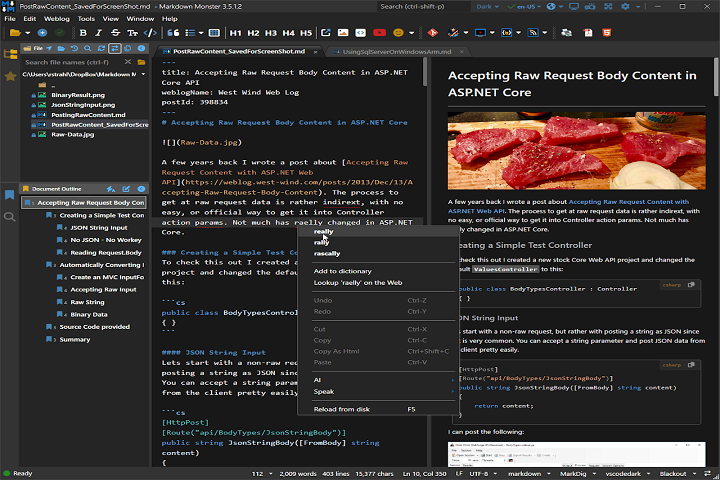
Description
Markdown Monster 4.1.5.2 is a comprehensive Markdown editor and content management tool that enhances productivity for writers and developers. It merges editing, previewing, and publishing capabilities in a single environment.
User Interface
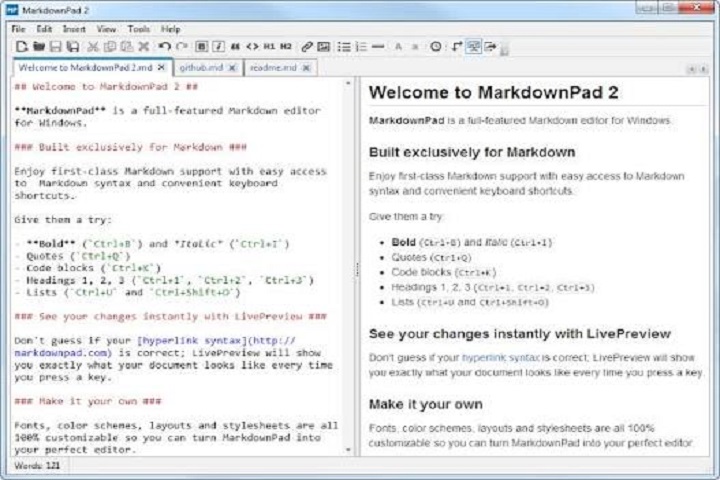
Markdown Monster features a modern, clean interface designed to reduce distractions and improve focus. The main editor supports multiple tabs, allowing users to work on several Markdown documents simultaneously. The live preview pane updates in real-time, displaying the formatted content alongside the raw Markdown code.
Markdown Editing Tools
The software includes syntax highlighting, auto-completion, and customizable keyboard shortcuts to simplify writing. Users can easily create headings, lists, code blocks, tables, and embedded media, while advanced search and replace functions help manage large documents.
Live Preview
One of Markdown Monster’s standout features is the live HTML preview. Changes made in the editor are instantly reflected in the preview pane, allowing users to see the final output without exporting. The preview supports custom CSS, themes, and interactive content like tables and code snippets.
Publishing and Export
Markdown Monster integrates with multiple publishing platforms, including WordPress, GitHub Pages, and Azure DevOps. Users can publish posts directly from the application. It also allows exporting documents to HTML, PDF, or image formats, providing flexibility for different publishing needs.
Extensibility and Customization
The software supports add-ins and extensions to enhance functionality. Users can create custom snippets, apply themes, and configure workflows for their specific writing and publishing requirements. Version 4.1.5.2 improves extension support and overall stability.
Developer-Friendly Features
Markdown Monster is particularly suitable for developers writing documentation. It supports fenced code blocks, syntax highlighting for multiple programming languages, and GitHub Flavored Markdown, ensuring that technical content is properly formatted and readable.
Key Features
Live Preview and Rendering
Instantly view Markdown content as formatted HTML in a live preview pane, supporting custom CSS and interactive content.
Syntax Highlighting
Enhance readability and reduce errors with syntax highlighting for Markdown elements, code blocks, and inline formatting.
Integrated Publishing
Publish directly to WordPress, GitHub Pages, or Azure DevOps without leaving the editor.
Export Options
Export Markdown files to HTML, PDF, or images for flexible sharing and publication.
Multi-Document Editing
Open multiple Markdown files in tabs, allowing seamless switching and comparison.
Customizable Snippets
Create reusable Markdown snippets for headings, code templates, tables, or other frequently used content.
Search and Replace
Advanced search and replace functionality, including support for regular expressions across single or multiple documents.
Extensible Add-ins
Support for add-ins to add extra functionality, automate tasks, or customize the editor experience.
GitHub Flavored Markdown Support
Ensure compatibility with GitHub and other platforms that use GitHub Flavored Markdown standards.
Cross-Platform Markdown Features
Preview tables, images, links, and code consistently across platforms, ensuring WYSIWYG-like experience.
How to Install
Installing Markdown Monster 4.1.5.2 is straightforward:
-
Check System Requirements
Ensure your PC meets the minimum hardware and software specifications. -
Run the Installer
Launch the downloaded executable and follow the on-screen instructions. -
Select Installation Options
Choose installation directory, start menu shortcuts, and optional components. -
Complete Installation
Click “Install” and wait for the process to finish. -
Launch the Software
Open Markdown Monster, configure preferences like themes, editor layout, and preview settings. -
Activate License
Enter your license key or start the trial version to unlock full features.
System Requirements
Minimum System Requirements
-
Operating System: Windows 7 / 8 / 10 / 11 (32-bit or 64-bit)
-
Processor: Intel or AMD 1 GHz or higher
-
RAM: 2 GB minimum
-
Storage: 150 MB free disk space
-
Display: 1024×768 minimum resolution