Introduction
HitmanPro.Alert 3.21.1.2039 is a robust cybersecurity solution designed to protect Windows PCs from malware, ransomware, exploits, and other cyber threats. Developed by SurfRight, HitmanPro.Alert goes beyond traditional antivirus software by focusing on proactive detection, real-time threat prevention, and advanced exploit protection.
With cyberattacks becoming increasingly sophisticated, traditional antivirus tools often fail to detect zero-day exploits, ransomware, and financial malware. HitmanPro.Alert addresses these challenges with behavioral analysis, exploit mitigation, and ransomware protection, making it an essential tool for individuals and businesses seeking comprehensive security. Version 3.21.1.2039 offers enhanced threat detection, improved performance, and expanded compatibility with Windows systems.
Overview
HitmanPro.Alert is designed as a lightweight, complementary security tool that works alongside existing antivirus programs without conflicts. Unlike standard antivirus applications, it focuses on real-time behavioral monitoring and active prevention, rather than solely relying on signature-based detection.
The software is ideal for:
-
Protecting against ransomware attacks
-
Preventing banking and financial malware infections
-
Mitigating zero-day exploits and system vulnerabilities
-
Enhancing overall system security without heavy performance impact
Key strengths of HitmanPro.Alert 3.21.1.2039 include:
-
Real-time exploit prevention for browsers, plugins, and software
-
Ransomware protection with file behavior monitoring
-
Anti-keylogger and privacy protection
-
Integration with Windows for seamless security without slowdown
Description
HitmanPro.Alert is a complementary cybersecurity solution designed to enhance existing protection layers on Windows PCs. Its focus is on proactive and behavior-based threat detection, helping users mitigate advanced attacks that traditional antivirus software may miss.
User Interface
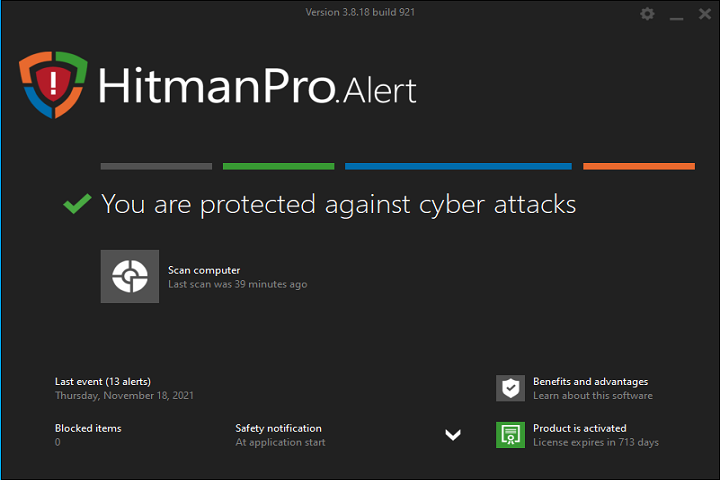
The interface is user-friendly and clean, providing a dashboard with status updates, active protection indicators, and alerts. Users can easily access configuration settings, scan history, and quarantine files without complex navigation.
Real-Time Threat Monitoring
HitmanPro.Alert continuously monitors system processes, memory, and critical files for suspicious behavior. By detecting abnormal activity patterns, it can identify malware, ransomware, and exploit attempts before they cause damage.
Exploit Mitigation
The software actively protects browsers, plug-ins, and system applications against exploit attacks. It shields vulnerabilities in Windows, Office applications, and third-party software from attackers attempting to execute malicious code.
Ransomware Protection
HitmanPro.Alert features behavioral analysis to detect and block ransomware activity. It monitors file encryption processes and prevents unauthorized file changes, ensuring critical data remains secure.
Privacy and Anti-Keylogger Tools
The software safeguards sensitive information, including keystrokes and clipboard data, against keyloggers and spyware. It also protects online banking transactions, making it ideal for financial security.
Key Features
Real-Time Exploit Protection
Prevents attackers from exploiting vulnerabilities in browsers, plugins, and other Windows applications, reducing the risk of zero-day attacks.
Ransomware Protection
Monitors file behavior and blocks unauthorized encryption attempts to safeguard important data.
Anti-Keylogger and Privacy Protection
Detects and blocks keyloggers and spyware to prevent theft of sensitive information, including passwords and financial data.
Behavioral Threat Detection
Analyzes suspicious behavior in processes and applications, enabling proactive detection of unknown malware and threats.
Banking Protection
Provides enhanced security for online banking, safeguarding transactions against malware, phishing, and keylogging attacks.
Lightweight and Compatible
Designed to work alongside existing antivirus software without performance conflicts or system slowdowns.
Automatic Updates
Keeps the software and threat definitions up to date to ensure maximum protection against the latest cyber threats.
Quarantine and Alert System
Isolates suspicious files in quarantine and provides real-time alerts for detected threats.
How to Install
Installing HitmanPro.Alert on a Windows PC is simple and user-friendly:
-
Verify System Requirements
Ensure your system meets the minimum hardware and software specifications. -
Run the Installer
Launch the setup file with administrator privileges. -
Follow Installation Steps
Accept the license agreement and select the desired installation directory. The installer will guide you through configuration options. -
Enable Real-Time Protection
After installation, enable real-time monitoring to start active threat prevention. -
Activate License
Enter the license key or activate the trial version to access full functionality. -
Restart if Required
Some system integrations may require a reboot to complete the setup.
System Requirements
Minimum System Requirements
-
Operating System: Windows 7 / 8 / 10 / 11 (32-bit or 64-bit)
-
Processor: Intel or AMD 1 GHz or faster
-
RAM: 2 GB minimum
-
Storage: 200 MB free disk space
-
Internet: Required for updates and cloud-based threat detection