Introduction
Freemake Video Converter 5.0.0.36 PC Software is a powerful multimedia tool designed to convert, edit, and manage video and audio files efficiently. Developed by Ellora Assets Corporation, Freemake Video Converter is renowned for its user-friendly interface and comprehensive feature set that caters to both casual users and professionals.
In the age of multimedia content, users often need to convert videos between different formats, extract audio tracks, or prepare files for specific devices. Freemake Video Converter 5.0.0.36 addresses these needs with a versatile, easy-to-use solution that supports hundreds of formats and offers additional features such as DVD burning, video editing, and online video downloading. This latest version emphasizes speed, stability, and expanded format compatibility, making it a complete tool for modern multimedia workflows.
Overview
Freemake Video Converter is designed to simplify video conversion and multimedia management without compromising quality or functionality. Its intuitive interface ensures that even beginners can perform complex tasks such as batch conversions or device-specific formatting with ease.
Key highlights of version 5.0.0.36 include:
-
Conversion between over 500 video and audio formats
-
Video editing tools such as trimming, cropping, and merging
-
Direct DVD and Blu-ray burning capabilities
-
Download videos from popular online platforms
-
Device-specific presets for smartphones, tablets, and gaming consoles
Freemake Video Converter caters to content creators, media enthusiasts, educators, and professionals who require fast, reliable, and high-quality video conversion.
Description
Freemake Video Converter 5.0.0.36 is a multi-functional video management tool that allows users to convert, edit, compress, and share videos and audio files effortlessly. Its focus is on efficiency, accessibility, and output quality.
User Interface
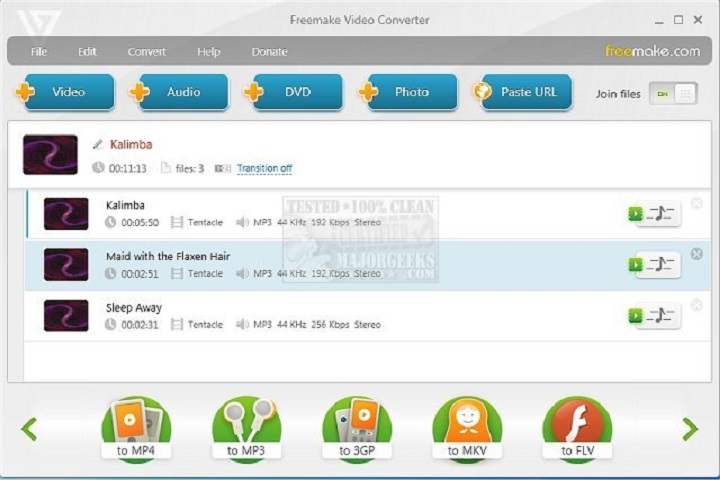
The software features a clean and intuitive interface, with a drag-and-drop system that simplifies file import. Users can quickly access conversion tools, editing functions, and device presets. A progress window displays the status of conversions and estimated completion times, improving workflow transparency.
Video Conversion
Freemake supports a wide range of video formats, including MP4, AVI, MKV, WMV, MOV, and more. Users can convert files for playback on smartphones, tablets, gaming consoles, or directly for web sharing. Batch conversion enables processing multiple files simultaneously, saving time and effort.
Audio Extraction and Conversion
Users can extract audio from video files and convert them to popular audio formats such as MP3, WMA, and WAV. This feature is particularly useful for creating music playlists, podcasts, or audio-only versions of videos.
Video Editing Tools
Freemake Video Converter includes essential editing tools:
-
Trim – Remove unwanted sections from videos
-
Crop – Adjust frame size and remove black bars
-
Merge – Combine multiple video clips into a single file
-
Rotate – Correct video orientation
-
Subtitles – Add or embed subtitles for accessibility
These editing functions allow users to customize videos before conversion or sharing.
DVD and Blu-ray Support
Freemake allows users to burn videos to DVD or Blu-ray discs with customizable menus, making it ideal for archiving, presentations, or gift creation. Users can also convert DVDs to digital formats for playback on modern devices.
Online Video Downloading
The software supports downloading videos from popular platforms such as YouTube, Facebook, Vimeo, and Dailymotion. Users can download videos in their preferred resolution or convert them directly to audio formats.
Output Optimization
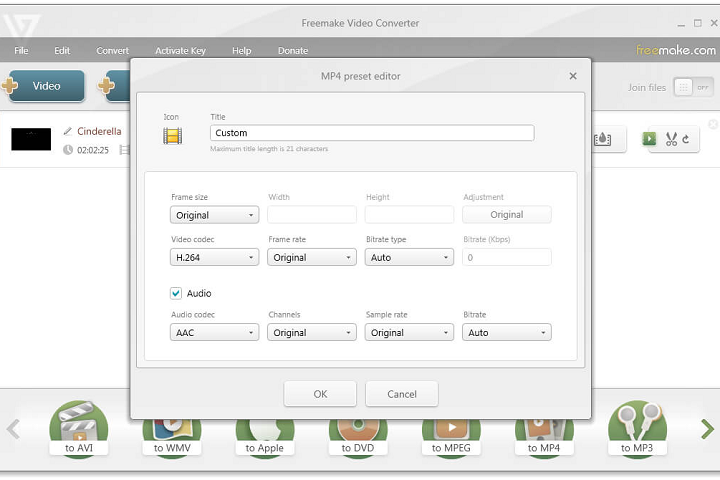
Freemake Video Converter provides device-specific presets for smartphones, tablets, and consoles, ensuring videos are compatible and optimized for each device. Users can also adjust resolution, bitrate, and frame rate for custom output settings.
Key Features
Supports Over 500 Formats
Convert videos and audio between a wide array of formats without loss of quality.
Batch Conversion
Convert multiple files simultaneously to save time and improve productivity.
Video Editing Tools
Trim, crop, merge, rotate, and add subtitles to video files directly within the software.
DVD & Blu-ray Burning
Burn videos to DVD or Blu-ray discs with customizable menus and chapters.
Online Video Downloading
Download and convert videos from popular websites for offline viewing.
Device-Specific Presets
Predefined output formats for smartphones, tablets, gaming consoles, and other devices.
Audio Extraction
Extract and convert audio tracks from video files to popular audio formats like MP3, WMA, and WAV.
High-Quality Output
Supports HD and 4K video conversion while maintaining optimal quality.
Customizable Output Settings
Adjust resolution, bitrate, frame rate, and codec settings for personalized output.
User-Friendly Interface
Drag-and-drop system, intuitive layout, and progress indicators for smooth workflow.
How to Install
Installing Freemake Video Converter is quick and straightforward:
-
Check System Requirements
Ensure your PC meets the minimum hardware and software specifications. -
Run the Installer
Launch the setup executable and follow the on-screen instructions. -
Select Installation Options
Choose installation directory, shortcuts, and optional components such as codecs or plugins. -
Complete Installation
Click “Install” and wait for the process to finish. -
Launch the Software
Open Freemake Video Converter and configure initial preferences such as output folder, default format, and device presets. -
Activate License
Enter a license key if using the paid version or continue with the free edition with limited features.
System Requirements
Minimum System Requirements
-
Operating System: Windows 7 / 8 / 10 / 11 (32-bit or 64-bit)
-
Processor: Intel or AMD 1 GHz or higher
-
RAM: 2 GB minimum
-
Storage: 500 MB free disk space
-
Display: 1024×768 minimum resolution
-
Internet: Required for online video downloading