Introduction
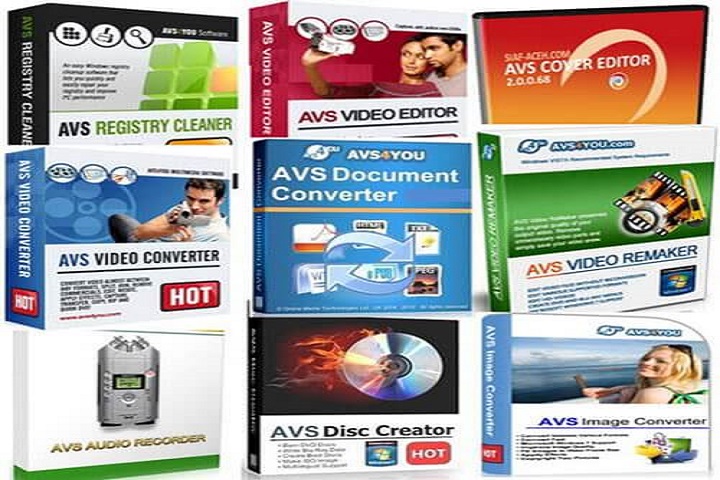
AVS4YOU Software AIO 26.0.2.17 PC Software is a comprehensive suite of multimedia tools designed to cover nearly all aspects of audio, video, and image processing on Windows PCs. Developed by Online Media Technologies Ltd., the AVS4YOU All-in-One (AIO) package provides users with a complete ecosystem of programs for editing, converting, creating, and managing multimedia content without the need for multiple software installations.
As content creation grows increasingly complex across platforms such as YouTube, social media, and online streaming, having a reliable all-in-one solution saves time, simplifies workflows, and ensures consistency across media formats. The AVS4YOU AIO package 26.0.2.17 consolidates all essential multimedia tools into a single installation, streamlining setup and licensing, while offering seamless integration between software modules.

Overview
The AVS4YOU All-in-One package is designed for users who want versatile multimedia capabilities in a single suite. It includes applications for video editing, audio processing, DVD and Blu-ray conversion, image editing, and more. This version, 26.0.2.17, enhances stability, performance, and compatibility with modern Windows systems, ensuring smooth operation across all included tools.
Key highlights include:
-
Unified installation for multiple AVS4YOU software products
-
Compatibility with the latest Windows 10 and 11 systems
-
Updated multimedia codecs and file format support
-
Improved software performance and resource management
-
Integrated licensing for all included applications
This package is ideal for home users, content creators, educators, and small businesses who require a full multimedia toolkit without managing separate installations.
Description
AVS4YOU Software AIO 26.0.2.17 is an all-in-one multimedia software suite that bundles multiple applications into a single, user-friendly installation package. Each application in the suite addresses a specific multimedia task, from video conversion to audio editing and image manipulation.
Included Software Modules
The AIO package typically includes:
-
AVS Video Editor – for video editing, trimming, merging, and effects.
-
AVS Video Converter – converts videos between formats, optimizes for devices.
-
AVS Audio Editor – edits, records, and enhances audio files.
-
AVS Audio Converter – converts audio files for different formats and devices.
-
AVS Image Converter – edits, resizes, and converts images between formats.
-
AVS DVD Creator – creates DVDs and Blu-ray discs from video projects.
-
AVS Screen Capture – records desktop activity for tutorials or presentations.
-
AVS Disc Creator – burns data to CDs, DVDs, and Blu-ray discs.
Each module is designed to work seamlessly with others, allowing files to be edited, converted, and exported without compatibility issues.
Unified Interface and Integration
The AIO package provides a central launcher interface that allows users to access all installed applications from a single dashboard. This improves workflow efficiency and reduces the need to search for individual programs.
Performance and Optimization
Version 26.0.2.17 introduces optimizations for faster video rendering, audio processing, and file conversions. Hardware acceleration for Intel, NVIDIA, and AMD graphics ensures smooth performance even with HD and 4K media.
File Format and Device Support
The AVS4YOU AIO package supports a wide range of multimedia formats for both import and export. Popular formats include MP4, AVI, MKV, MOV, MP3, WAV, FLAC, JPG, PNG, and more. Device presets are included for smartphones, tablets, gaming consoles, and media players, allowing users to create content optimized for their audience.
Key Features
All-in-One Multimedia Suite
Access multiple professional-grade tools in a single installation package.
Video Editing Tools
Trim, merge, apply effects, and export videos for different formats and devices.
Audio Editing and Conversion
Record, edit, clean, and convert audio files with built-in effects and filters.
Image Editing and Conversion
Edit, resize, and convert images in bulk with support for major formats.
DVD/Blu-ray Creation
Burn video projects to discs or extract video from DVDs for editing.
Screen Recording
Capture desktop activity, gameplay, or tutorials with audio narration.
Batch Processing
Process multiple files simultaneously across different modules for efficiency.
Hardware Acceleration
Speed up processing using GPU acceleration for faster rendering and conversions.
Device Presets
Export content optimized for smartphones, tablets, TVs, and gaming consoles.
User-Friendly Interface
Centralized launcher for easy access to all applications with consistent navigation.
Regular Updates
Includes the latest multimedia codecs and software enhancements for better performance.
How to Install
Installing the AIO package is simple but requires careful attention to system configuration:
-
Check System Requirements
Ensure your PC meets or exceeds the minimum system requirements for smooth operation. -
Run the Installer
Double-click the setup file and run it as administrator. -
Select Installation Options
Choose which software modules to install, the destination folder, and optional shortcuts. -
Complete Installation
Follow the on-screen instructions until the installation finishes. -
Launch the Software Suite
Open the AIO launcher to access all included applications. -
Activate License
Enter your license key to unlock all features across the suite, or use the trial version if applicable.
System Requirements
Minimum System Requirements
-
Operating System: Windows 7 / 8 / 10 / 11
-
Processor: Intel or AMD 1.5 GHz or higher
-
RAM: 2 GB minimum
-
Storage: 2 GB free disk space
-
Display: 1024×768 resolution
-
Sound Card: Required for audio modules