Introduction
AVS Video Converter 26.0.2.17 PC Software is a comprehensive multimedia solution designed to help users convert, edit, compress, and optimize video files for a wide range of devices and platforms. Developed by Online Media Technologies Ltd., AVS Video Converter has long been recognized as a reliable and user-friendly tool suitable for both beginners and advanced users.
With the growing demand for video content across social media, streaming platforms, mobile devices, and professional environments, managing different video formats has become essential. AVS Video Converter 26.0.2.17 addresses this need by offering extensive format support, built-in editing tools, and high-quality output options. This version focuses on improved performance, enhanced compatibility with modern codecs, and a smoother user experience on Windows systems. 
Overview
AVS Video Converter is designed to simplify complex video tasks into an intuitive workflow. It allows users to convert videos between popular formats, prepare files for specific devices, and perform basic video editing—all within a single application.
Key highlights of version 26.0.2.17 include:
-
Support for all major video formats and codecs
-
Device-specific presets for smartphones, tablets, and gaming consoles
-
Built-in video editing and enhancement tools
-
Hardware acceleration for faster conversions
-
High-quality output with customizable settings
AVS Video Converter is widely used by content creators, educators, marketers, and home users who need fast, reliable, and flexible video conversion software.
Description
AVS Video Converter 26.0.2.17 is a feature-rich video conversion and editing tool that combines simplicity with advanced functionality. It allows users to handle nearly every aspect of video preparation, from format conversion to final optimization.
User Interface
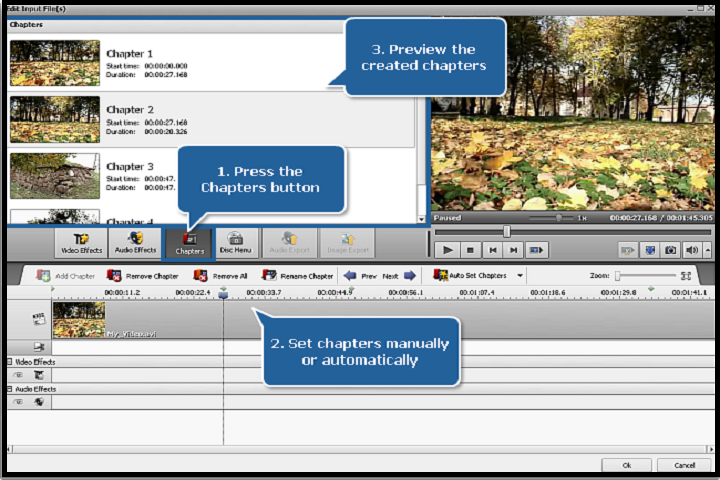
The software features a modern, clean, and intuitive interface. Files can be added via drag-and-drop, and the step-by-step layout makes it easy to choose formats, apply edits, and start conversions. The preview window allows users to see changes in real time before exporting the final file.
Video Conversion Capabilities
AVS Video Converter supports a wide range of formats, including MP4, AVI, MKV, MOV, WMV, FLV, and more. Users can convert videos for playback on Windows, macOS, Android, iOS, smart TVs, and gaming consoles. Batch conversion allows multiple files to be processed simultaneously, saving time.
Video Editing Tools
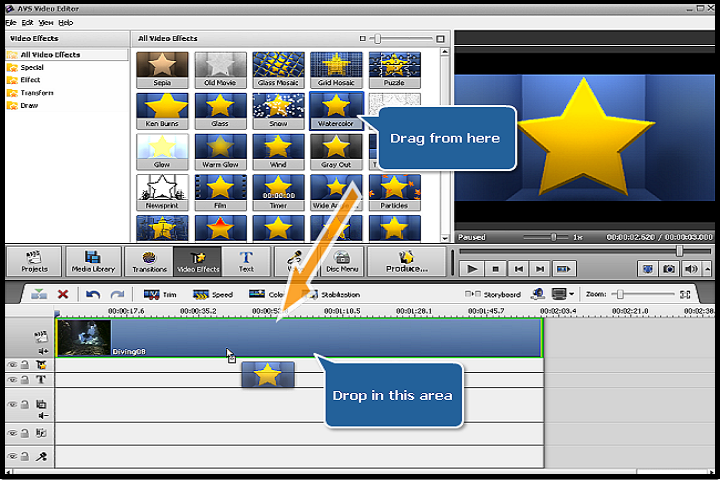
In addition to conversion, AVS Video Converter includes built-in editing features such as:
-
Trimming and cutting unwanted sections
-
Merging multiple clips into one video
-
Cropping and rotating videos
-
Adjusting brightness, contrast, and color
-
Adding text, logos, or watermarks
These tools enable users to customize videos without requiring separate editing software.
DVD and Media Support
AVS Video Converter can convert video files for DVD creation and also extract video from DVDs for backup or playback on other devices. This feature is particularly useful for preserving older media collections.
Hardware Acceleration
The software supports hardware acceleration technologies such as Intel Quick Sync, NVIDIA CUDA, and AMD acceleration. This significantly reduces conversion time and improves performance, especially when working with HD or 4K videos.
Output Quality and Customization
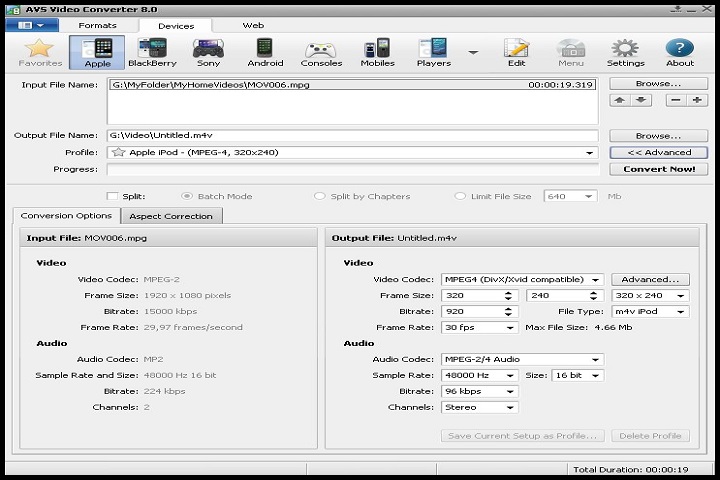
Users can fine-tune output parameters including resolution, bitrate, frame rate, and codec settings. This level of control ensures the best balance between file size and video quality for different use cases.
Key Features
Wide Format Support
Convert videos between all popular formats, including HD and 4K resolutions.
Device Presets
Preconfigured profiles for smartphones, tablets, gaming consoles, and media players.
Built-In Video Editor
Edit videos directly within the converter using trimming, cropping, and effects.
Batch Conversion
Process multiple video files at the same time for maximum efficiency.
Hardware Acceleration
Faster conversions using GPU acceleration technologies.
High-Quality Output
Maintain excellent video and audio quality after conversion.
DVD Conversion Support
Convert DVDs to digital formats for modern playback.
Custom Output Settings
Manually adjust encoding parameters for advanced control.
User-Friendly Interface
Simple workflow suitable for beginners and professionals alike.
Reliable Performance
Optimized for stability and speed on modern Windows systems.
How to Install
Installing AVS Video Converter is a straightforward process:
-
Verify System Requirements
Make sure your PC meets the minimum hardware and software requirements. -
Run the Installer
Double-click the installer and run it with administrator privileges. -
Choose Installation Options
Select the installation directory and optional components. -
Complete the Installation
Follow the on-screen instructions until setup is complete. -
Launch the Software
Open AVS Video Converter and configure default output folders and preferences. -
Activate License
Enter your license key or use the trial version to explore features.
System Requirements
Minimum System Requirements
-
Operating System: Windows 7 / 8 / 10 / 11
-
Processor: Intel or AMD 1.5 GHz or higher
-
RAM: 2 GB minimum
-
Storage: 300 MB free disk space
-
Display: 1024×768 resolution
-
Internet: Required for activation and updates