Introduction
AVS Audio Editor 26.0.2.17 PC Software is a professional yet user-friendly audio editing application designed for creating, editing, and enhancing audio files on Windows PCs. Developed by Online Media Technologies Ltd., AVS Audio Editor is widely used by musicians, podcasters, content creators, educators, and home users who need precise control over audio recordings without a steep learning curve.
As audio content continues to dominate digital platforms—ranging from podcasts and music production to video soundtracks and online tutorials—the demand for reliable audio editing tools has grown significantly. AVS Audio Editor 26.0.2.17 meets this demand by offering a comprehensive set of editing features, support for popular audio formats, and real-time effects processing. This version emphasizes improved performance, enhanced compatibility with modern Windows systems, and refined audio processing capabilities. 
Overview
AVS Audio Editor is designed to make audio editing accessible, accurate, and efficient. Whether you are cleaning up voice recordings, editing music tracks, or preparing audio for video projects, the software provides all the essential tools in a streamlined interface.
Key highlights of version 26.0.2.17 include:
-
Support for all major audio formats
-
Non-destructive waveform editing
-
Built-in audio effects and filters
-
Noise reduction and audio restoration tools
-
Export options optimized for multiple platforms
AVS Audio Editor is suitable for both beginners and professionals who require high-quality audio output with minimal complexity.
Description
AVS Audio Editor 26.0.2.17 is a feature-rich digital audio editing solution that allows users to record, edit, enhance, and export audio files with precision. It combines advanced editing capabilities with an intuitive workflow, making it ideal for a wide range of audio-related tasks.
User Interface
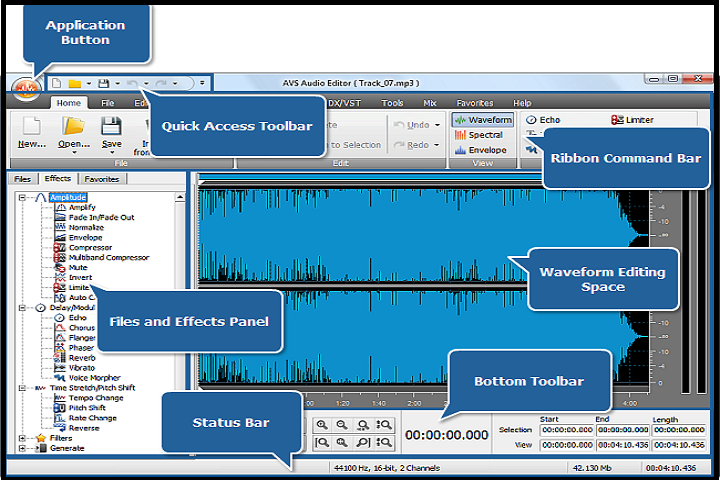
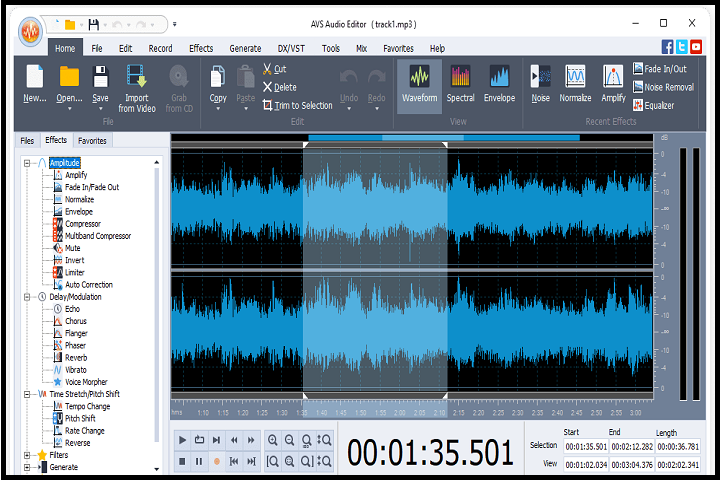
The software features a clean and modern interface with a waveform-based editing environment. Users can zoom in on audio tracks for precise edits, visually identify sound patterns, and apply changes in real time. The interface is designed to minimize distractions while providing quick access to editing tools and effects.
Audio Editing Capabilities
AVS Audio Editor supports essential and advanced editing operations such as:
-
Cutting, trimming, copying, and pasting audio segments
-
Splitting tracks into multiple sections
-
Merging multiple audio files into one
-
Adjusting volume levels and balance
These tools allow users to fine-tune recordings with accuracy and efficiency.
Audio Effects and Filters
The software includes a wide range of built-in audio effects and filters, including:
-
Equalizer and amplification tools
-
Echo, reverb, and chorus effects
-
Time stretch and pitch shift
-
Fade-in and fade-out effects
These features enable users to enhance sound quality and add creative elements to their audio projects.
Noise Reduction and Restoration
AVS Audio Editor includes powerful noise reduction tools that help remove background noise, clicks, hums, and other unwanted artifacts. This is particularly useful for cleaning up voice recordings, interviews, or old audio files.
Recording and Import Options
Users can record audio directly from microphones, line-in devices, or system sound. The software also supports importing audio from video files, making it easy to extract and edit soundtracks.
Export and Format Support
AVS Audio Editor supports popular audio formats such as MP3, WAV, FLAC, AAC, OGG, and WMA. Users can export audio with customizable bitrate, sample rate, and channel settings to ensure compatibility with different platforms and devices.
Key Features
Multi-Format Audio Support
Edit and export audio in all major formats with high-quality output.
Waveform-Based Editing
Visual waveform display allows precise and accurate audio edits.
Built-In Audio Effects
Apply professional effects like reverb, equalizer, echo, and pitch adjustment.
Noise Reduction Tools
Remove background noise and audio imperfections effectively.
Non-Destructive Editing
Make changes without permanently altering original audio files.
Direct Audio Recording
Record audio directly from microphones or other audio sources.
Audio Extraction
Extract audio tracks from video files for editing or reuse.
Custom Export Settings
Control bitrate, sample rate, and audio channels for optimized output.
User-Friendly Interface
Easy-to-use layout suitable for beginners and advanced users.
Stable Performance
Optimized for smooth operation on modern Windows systems.
How to Install
Installing AVS Audio Editor is quick and straightforward:
-
Check System Requirements
Ensure your PC meets the minimum hardware and software requirements. -
Run the Installer
Double-click the installer file and run it with administrator privileges. -
Choose Installation Settings
Select the installation directory and optional components if available. -
Complete Installation
Follow the on-screen instructions until the setup process finishes. -
Launch the Software
Open AVS Audio Editor and configure default recording and export preferences. -
Activate License
Enter your license key or use the trial version to explore features.
System Requirements
Minimum System Requirements
-
Operating System: Windows 7 / 8 / 10 / 11
-
Processor: Intel or AMD 1.5 GHz or higher
-
RAM: 2 GB minimum
-
Storage: 300 MB free disk space
-
Sound Card: Required for recording and playback
-
Display: 1024×768 resolution