Introduction
AllMapSoft Offline Map Maker 8.373 PC Software,In today’s digital age, access to maps and navigation tools is often taken for granted. However, reliable internet connectivity is not always guaranteed — whether you are traveling to remote locations, conducting field research, or working in areas with limited network access. This is where AllMapSoft Offline Map Maker 8.373 comes into play. Designed for Windows PCs, this software allows users to download, view, and save high-resolution maps from popular online sources for offline use. It provides a convenient solution for travelers, GIS professionals, and outdoor enthusiasts who need access to maps without relying on a continuous internet connection.
With Offline Map Maker, users can select any geographic area, download map tiles from sources like Google Maps, Bing Maps, OpenStreetMap, and other providers, and merge them into complete offline maps. This not only ensures uninterrupted access to mapping data but also enables printing, navigation, and integration with other GIS tools.
Overview
AllMapSoft Offline Map Maker is a Windows-based mapping utility that enables users to create offline maps from online sources. The software is part of the AllMapSoft suite of mapping tools, widely recognized for their efficiency, flexibility, and ease of use. Version 8.373 is an updated release that improves performance, stability, and compatibility with multiple map providers. (allmapsoft.com)
Offline Map Maker is ideal for both casual users and professionals. It supports downloading maps at multiple zoom levels, generating high-quality offline images, and exporting data in multiple formats for various uses. Unlike many other mapping tools, Offline Map Maker allows you to work independently of the internet once the maps have been downloaded, making it perfect for fieldwork, travel, and offline GIS analysis.
Description
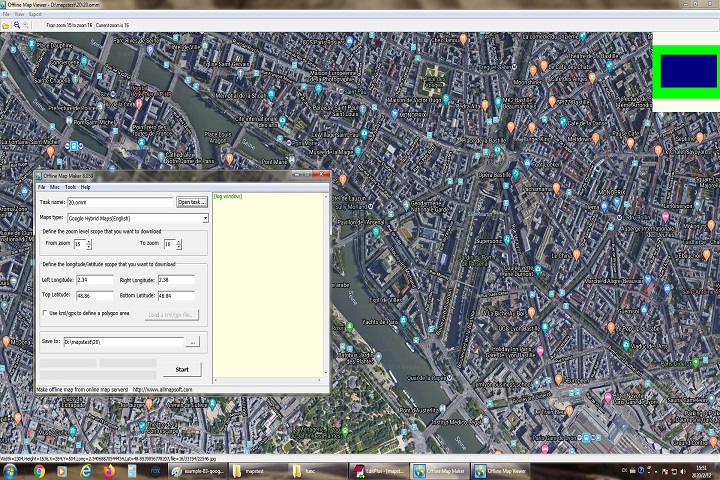
Offline Map Maker operates by downloading individual map tiles from online map providers. Each tile represents a small portion of the map at a specific zoom level. The software automatically downloads these tiles and stitches them together into a cohesive, high-resolution image. Users can define the region of interest either manually or using KML/GPX files, which is especially useful for professional mapping projects or pre-planned travel routes. (allmapsoft.com)
The software supports various output formats such as BMP, JPG, TIFF, PNG, WEBP, KMZ, and MBTiles, making it compatible with GIS software, mobile navigation apps, and web-based platforms. Additionally, Offline Map Maker provides a built-in map viewer that allows users to explore downloaded maps, zoom in and out, and adjust display settings before exporting or printing. This functionality ensures that the maps are not only accessible offline but are also fully usable for practical applications.
Offline Map Maker is versatile and can handle both small, localized maps for personal travel and large-scale maps for professional purposes. Its ability to download maps at multiple zoom levels ensures clarity and detail, whether you’re examining city streets or tracking broader regional areas.
Key Features
1. Multi-Source Map Support
Offline Map Maker supports a wide variety of map providers, including Google Maps, Bing Maps, OpenStreetMap, and more. This ensures users can access the most accurate and up-to-date maps for their specific region.
2. Multi-Zoom Level Downloads
Users can choose the zoom levels they want to download, enabling detailed street-level maps or broader regional overviews within the same project.
3. High-Resolution Map Stitching
The software automatically merges downloaded tiles into seamless, high-quality map images, ideal for printing or offline use.
4. Broad Output Format Options
Maps can be exported to multiple formats including BMP, JPG, TIFF, PNG, WEBP, KMZ, and MBTiles, making them compatible with GIS tools, mobile apps, and web applications.
5. Built-In Preview and Map Browser
Before downloading, users can preview map regions directly in the software, allowing them to adjust areas and zoom levels as needed.
6. KML/GPX Integration
Offline Map Maker supports KML and GPX files, allowing precise definition of regions for download — useful for travel routes, research projects, or GIS mapping.
7. Compatibility with GIS and Navigation Tools
The software’s output is compatible with QGIS, MapBox, RMaps, OruxMaps, and other navigation or GIS platforms.
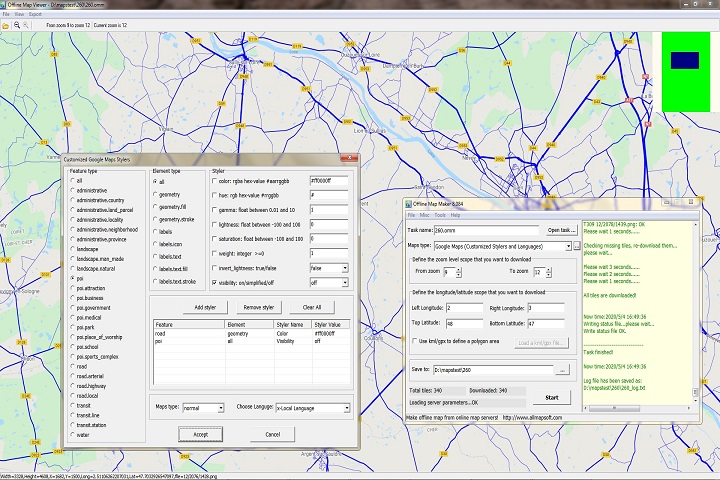
8. Customization Options
Users can control image quality, file formats, merging options, and interactive HTML output settings for offline map projects.
How to Install
Installing Offline Map Maker is simple and requires minimal technical knowledge:
Step 1: Launch the Installer
Double-click the downloaded .exe file to start the installation wizard.
Step 2: Accept the License Agreement
Read and accept the End-User License Agreement (EULA) to proceed. Offline Map Maker is shareware, and while the trial version offers basic functionality, full access requires purchasing a license.
Step 3: Choose Installation Directory
Select a folder where you want the software installed, then click Next.
Step 4: Complete Installation
Click Install and wait for the process to finish. Once installation is complete, launch the software from your Start Menu shortcut.
Step 5: Configure First Map Project
When you first open Offline Map Maker, configure map sources, download regions, and preferred zoom levels. Optionally, import KML/GPX files to define areas of interest.
System Requirements
To run AllMapSoft Offline Map Maker 8.373 efficiently, ensure your system meets these requirements:
Operating System
-
Windows 7 / 8 / 10 / 11 (32-bit & 64-bit)
Processor
-
Intel or AMD CPU with 1 GHz or higher (faster recommended for large map downloads)
Memory (RAM)
-
Minimum: 2 GB
-
Recommended: 4 GB or more for large regions
Storage
-
100 MB free space for the application
-
Additional space needed for downloaded maps depending on project size
Internet Connection
-
Required for downloading map tiles from online providers
-
Not required for viewing downloaded maps offline