
Introduction
NTLite PC Software Windows operating systems come pre-packaged with numerous components, services, and applications that many users neither need nor want. This bloat not only consumes valuable storage space but can also impact system performance, privacy, and boot times. Enter NTLite Free, a powerful yet accessible PC software tool that empowers users to customize, streamline, and optimize their Windows installation images like never before. Whether you’re an advanced user seeking to remove unwanted components, an IT professional deploying standardized systems, or simply someone who wants a cleaner, faster Windows experience, NTLite provides the tools to transform your operating system from a one-size-fits-all solution into a tailored computing environment that matches your exact needs and preferences.
Overview
NTLite Free is a comprehensive Windows image management tool developed by NTlite.com that allows users to modify Windows installation files (ISO/WIM/ESD formats) directly, without requiring installation on a live system. The software serves as a Swiss Army knife for Windows customization, offering capabilities ranging from simple component removal to advanced integration of drivers, updates, and registry tweaks. Unlike many system optimization tools that work on already-installed systems, NTLite operates at the deployment level, allowing users to create custom Windows installations that are optimized from the very first boot. The free version provides substantial functionality that makes Windows customization accessible to non-commercial users, while paid versions expand these capabilities for business and enterprise environments.
Description
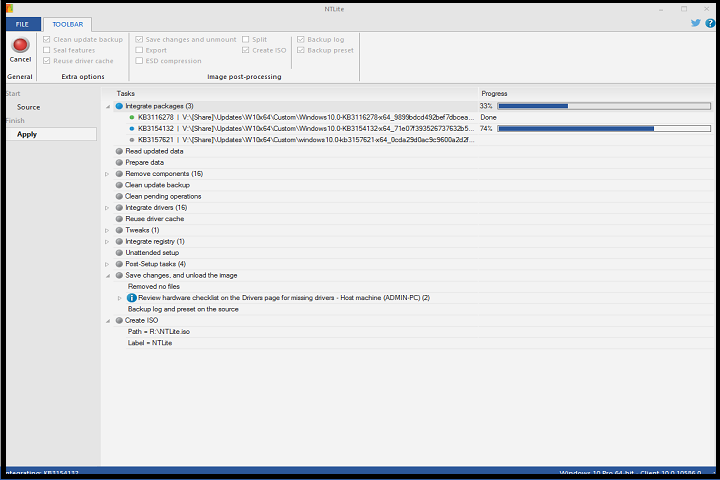
At its core, NTLite is an image editing suite that works with Windows installation media across versions including Windows 10, 11, and corresponding server editions. The software presents a user-friendly interface that belies its powerful capabilities, allowing users to load Windows images, browse their structure, and make modifications through an intuitive point-and-click environment. What sets NTLite apart is its component-based approach—it understands Windows at a granular level, identifying individual features, system applications, drivers, and services that can be safely removed or modified.
The application operates in a safe, non-destructive manner. Users work with copies of their installation files, preserving original media while experimenting with customizations. NTLite includes intelligent dependency checking to prevent users from removing essential components that would render Windows unbootable or unstable. Beyond removal capabilities, the software enables integration of updates, language packs, drivers, and automated setup configurations, essentially allowing users to create their own personalized Windows distributions that install with all preferred settings and without unwanted elements from the first moment of use.
Key Features
1. Component Removal Engine
The cornerstone feature that allows selective removal of Windows components including built-in applications (like Cortana, Edge, various Microsoft store apps), system features, services, and drivers. This dramatically reduces installation footprint and improves performance.
2. Update and Driver Integration
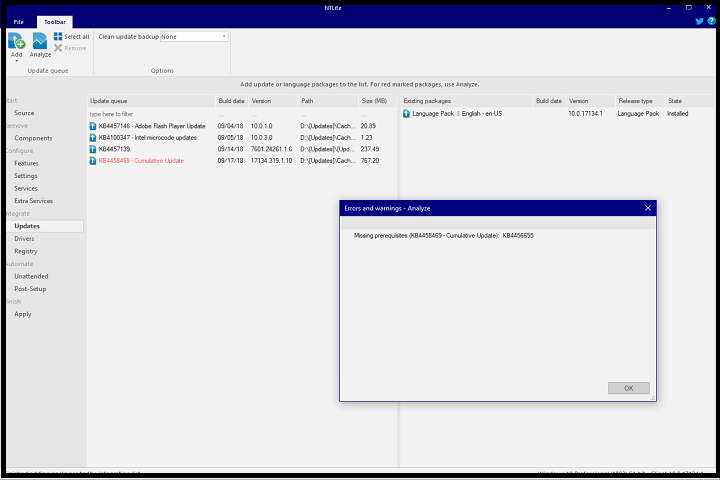
Seamlessly integrate Windows updates, service packs, language packs, and third-party drivers directly into the installation image, eliminating the need to download and install them post-deployment.
3. Registry and Settings Tweaks
Pre-configure hundreds of Windows settings including privacy options, security policies, user interface preferences, and performance tweaks that apply during installation rather than requiring manual configuration afterward.
4. Unattended Installation Setup
Create fully automated installation configurations with predefined user accounts, product keys, regional settings, and network configurations—perfect for deploying multiple identical systems.
5. Image Management Tools
Support for various Windows image formats (WIM, ESD, SWM) with capabilities to mount, edit, split, merge, and export images with modified components intact.
6. Compatibility and Dependency Checker
Intelligent system that warns users about potential issues when removing components, checking for dependencies that could affect system stability or functionality.
7. Live Session Editing (Paid Feature in Free Trial)
While primarily an image editor, NTLite offers live editing capabilities in paid versions, allowing modification of currently running Windows installations—a feature available in time-limited trial mode.
8. Preset Management
Save customization configurations as presets that can be reused across different Windows versions or shared with other users, ensuring consistency in deployment scenarios.
How To Install
Installing NTLite Free is a straightforward process designed to get users customizing Windows images quickly:
1: Download and Preparation
-
Visit the (heropcs.net) and navigate to the download section.
-
Select the free version and download the installer package (approximately 50-100 MB).
-
Ensure you have .NET Framework 4.7.2 or later installed (most modern Windows systems include this by default).
2: Installation Process
-
Locate the downloaded installer file (typically
ntlite_setup.exe). -
Right-click and select “Run as administrator” to ensure proper installation permissions.
-
Follow the installation wizard, accepting the license agreement when prompted.
-
Choose your preferred installation directory (default is
C:\Program Files\NTLite). -
Select whether to create desktop and start menu shortcuts (recommended for easy access).
-
Complete the installation and launch NTLite from the created shortcut.
3: Initial Setup and Activation
-
Upon first launch, NTLite will prompt for license activation. For the free version, select “Free” or “Continue in Free Mode.”
-
The software may check for updates—download if available for latest features and compatibility.
-
Familiarize yourself with the interface, particularly the “Home” tab which serves as your starting point for loading Windows images.
4: Loading Your First Image
-
Insert Windows installation media or locate your Windows ISO file.
-
In NTLite, click “Add” and select your Windows image source.
-
Choose between “Image” mode (for modifying installation files) or “Live” mode (for modifying running system, limited in free version).
-
Select the Windows edition you wish to customize (e.g., Windows 10 Pro, Home, etc.).
-
Wait for NTLite to load and index the image components (this may take several minutes depending on system speed and image size).
System Requirements
NTLite Free is designed to run efficiently on modest hardware while handling potentially large Windows image files:
Minimum Requirements:
-
Operating System: Windows 7 SP1 64-bit or later (Windows 10/11 recommended for best compatibility)
-
Processor: 1 GHz dual-core CPU (Intel Core i3 or equivalent AMD processor)
-
Memory: 2 GB RAM (4 GB strongly recommended when working with larger images)
-
Storage: 500 MB free space for application installation, plus 10-20 GB temporary working space for image editing operations