Introduction
Zen Ad-Blocker 0.19.1 PC Software,Online advertisements have become increasingly intrusive, appearing in websites, mobile apps, and even desktop software. While ads often support free online services, they can also slow down browsing, track user behavior, and sometimes expose users to malicious scripts or malware. To address these issues, ad-blocking software has become an essential tool for many internet users. One such solution is Zen Ad-Blocker, a modern system-wide ad-blocking and privacy protection tool designed for desktop operating systems.
Zen Ad-Blocker 0.19.1 is an open-source application that blocks advertisements, trackers, and unwanted network requests across an entire system rather than only inside a web browser. Unlike traditional browser extensions that work only within a specific browser, Zen operates at the system level and filters internet traffic from many applications. This approach provides stronger privacy protection and a cleaner browsing experience.
With a focus on simplicity, efficiency, and privacy, Zen Ad-Blocker has become a popular option for users who want a lightweight yet powerful solution to remove ads and tracking scripts. It supports multiple platforms including Windows, macOS, and Linux, making it suitable for a wide range of users.

Overview
Zen Ad-Blocker is a free and open-source desktop application developed to improve online privacy and browsing performance. Instead of relying on browser extensions alone, Zen works by creating a local filtering proxy that intercepts network traffic from applications and blocks requests associated with ads, trackers, and malicious content.
This system-wide filtering capability allows Zen to block advertisements in multiple browsers such as Chrome, Firefox, Edge, Safari, and Opera, as well as in many desktop applications that use internet connectivity. Because Zen processes traffic locally on the user’s device, it does not send browsing data to external servers, ensuring better privacy protection.
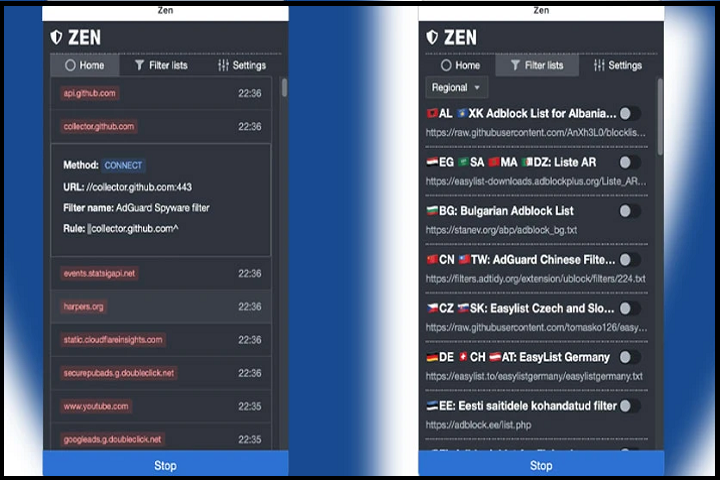
Zen also provides a graphical interface that allows users to monitor blocked requests in real time and manage filter lists easily. Users can enable or disable filters, whitelist websites, and customize rules based on their preferences. This flexibility makes Zen suitable for both beginners and advanced users who want full control over their internet traffic.
Description
Zen Ad-Blocker is designed as a comprehensive privacy and security tool that prevents unwanted content from reaching a user’s device. It functions by analyzing HTTP and HTTPS network requests generated by applications and blocking those that match advertising networks, tracking scripts, or malicious domains.
Unlike DNS-based ad blockers, which block entire domains before a connection is established, Zen operates at the HTTP(S) level. This allows it to analyze individual requests and apply more detailed filtering rules. As a result, Zen can block specific elements such as scripts, trackers, and advertising resources without blocking the entire website.
The software comes with several preconfigured filter lists that cover advertising networks, tracking services, and potential security threats. Users can also import additional filter lists such as EasyList or hosts files to expand protection. This customizable design allows Zen to adapt to different browsing environments and regional ad networks.
Zen is also optimized for performance. By removing ads and unnecessary scripts before they load, it can help reduce page load times and save bandwidth. In many cases, websites load faster and consume fewer system resources when Zen is active.
Overall, Zen Ad-Blocker combines ad blocking, privacy protection, and network filtering into a single lightweight application.
Key Features
Zen Ad-Blocker 0.19.1 offers several useful features that improve online browsing and privacy:
1. System-Wide Ad Blocking
Zen blocks advertisements across the entire operating system, not just within web browsers. This means ads and trackers from many desktop applications can also be filtered.
2. Tracker and Privacy Protection
The software prevents tracking scripts and monitoring services from collecting information about browsing habits, improving overall online privacy.
3. Built-in Filter Lists
Zen includes several preconfigured filter lists designed to block common advertising networks, malicious domains, and tracking scripts.
4. Custom Filter Support
Users can add their own filter lists or rules, including popular formats such as EasyList and hosts files.
5. Real-Time Monitoring
The application provides a dashboard that shows blocked requests in real time, helping users understand what content is being filtered.
6. Cross-Platform Compatibility
Zen supports multiple operating systems including Windows, macOS, and Linux, making it accessible for a wide range of users.
7. Lightweight and Efficient
The software runs quietly in the background with minimal system resource usage.
8. Open-Source and Free
Zen is completely free to use and its source code is publicly available, ensuring transparency and security.
How To Install
Installing Zen Ad-Blocker on a PC is straightforward. Follow these steps:
Step 1: Download the Software
Visit the official Zen website or GitHub repository and download the Windows installer for Zen Ad-Blocker 0.19.1.
Step 2: Run the Installer
Locate the downloaded file and double-click it to start the installation process.
Step 3: Follow Setup Instructions
Follow the on-screen instructions provided by the installer. Choose the installation location and complete the setup.
Step 4: Install the Local Certificate
During the first launch, Zen may ask permission to install a local root certificate. This certificate allows the program to filter encrypted HTTPS traffic. The certificate is generated locally and remains on the user’s device.
Step 5: Launch the Application
Once installation is complete, open Zen Ad-Blocker from the desktop or start menu.
Step 6: Configure Filters
Enable the recommended filter lists or add custom filters to optimize ad blocking.
After these steps, Zen will automatically begin blocking ads and trackers across the system.
System Requirements
To run Zen Ad-Blocker 0.19.1 smoothly, your system should meet the following minimum requirements:
Operating System
-
Windows 10 or Windows 11
-
macOS (Intel or Apple Silicon)
-
Linux (GNOME or KDE environments recommended)
Processor
-
64-bit processor (x64 or ARM64)
RAM
-
Minimum 2 GB RAM (4 GB recommended)
Storage
-
Approximately 100 MB of free disk space
Internet Connection
-
Required for downloading filter lists and updates
Because Zen is designed to be lightweight, it typically runs efficiently even on modest hardware configurations.