Introduction
UPX 5.1.0 PC Software,In today’s fast-paced software development environment, reducing file sizes without compromising functionality is critical. UPX 5.1.0 is a powerful, open-source executable packer for Windows PC that compresses executables, libraries, and binaries efficiently. Designed for developers, IT professionals, and system administrators, UPX stands for Ultimate Packer for eXecutables, and it has long been recognized as one of the fastest and most reliable tools for shrinking software without affecting performance.
With UPX 5.1.0, developers can optimize distribution packages, reduce download sizes, and improve software loading times. Its ability to compress multiple file formats, combined with ease of use and advanced compression algorithms, makes UPX a must-have utility in both professional and hobbyist development environments.

Overview
UPX 5.1.0 is a cross-platform executable compressor that supports Windows, Linux, and macOS platforms, though the Windows build remains the most popular among developers. The software works with PE (Portable Executable) files on Windows, allowing executable (.exe) and dynamic link library (.dll) files to be compressed dramatically, sometimes reducing sizes by more than 50% depending on the file type.
Unlike traditional compression tools, UPX does not require decompressing archives manually. It integrates compression directly into the executable itself, so users can run compressed files natively without additional software. This seamless operation preserves the original functionality of applications while minimizing disk usage.
UPX 5.1.0 is especially popular among software developers distributing utilities, games, or scripts, as it allows for smaller downloads, faster installation, and efficient storage management.
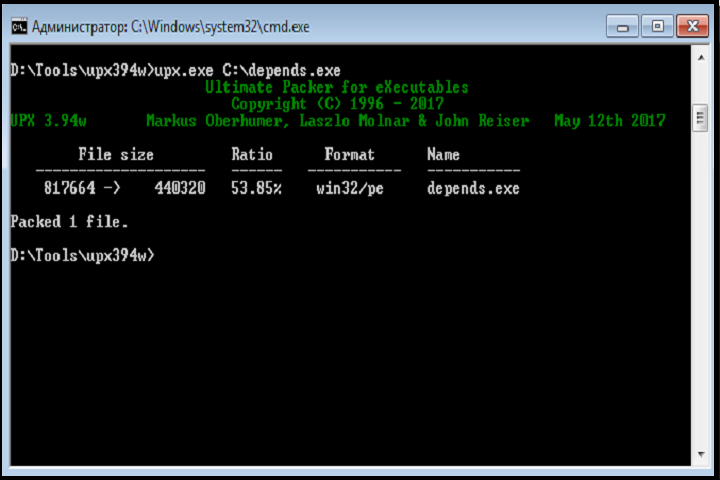
Description
UPX 5.1.0 employs high-performance compression algorithms optimized for executable files. It supports multiple formats including PE for Windows, ELF for Linux, and Mach-O for macOS, making it highly versatile. The software maintains the integrity of compressed files, ensuring that the original functionality, startup speed, and execution behavior are preserved.
The tool provides both command-line interface (CLI) and optional GUI front-ends for ease of use. Developers can compress a single executable, batch compress multiple files, or create scripts for automated processing. UPX also supports advanced features such as selective section compression, custom compression levels, and encryption-resistant packing.
Furthermore, UPX 5.1.0 includes integrity checks that validate compressed executables, helping avoid runtime errors. It is compatible with 32-bit and 64-bit binaries and works with Windows API functions, making it suitable for professional development environments.
UPX is lightweight, open-source, and does not require installation, which means developers can include it in portable toolkits for on-the-go optimization and testing.
Key Features
UPX 5.1.0 is packed with features that make it the industry-standard executable compressor:
-
High Compression Ratio – Reduces file sizes significantly without losing functionality.
-
Cross-Platform Support – Works with Windows PE, Linux ELF, and macOS Mach-O executables.
-
32-bit and 64-bit Compatibility – Supports modern architecture standards.
-
Command-Line Interface – Enables scripting and batch processing.
-
Integrity Checks – Ensures compressed files run correctly without errors.
-
Selective Section Compression – Compress only specific sections for optimization.
-
Lightweight and Portable – Can run without installation; ideal for toolkits.
-
Fast Compression and Decompression – Optimized for speed during runtime.
-
Open-Source License – Free to use, modify, and integrate in projects.
-
Advanced Compression Algorithms – Balances speed and size reduction for optimal performance.
These features make UPX indispensable for developers who want to optimize software delivery while maintaining full functionality.
How To Install UPX 5.1.0 on Windows PC
Installing UPX 5.1.0 is straightforward since it is portable and does not require a traditional installation:
-
Extract the ZIP file to a folder of your choice.
-
Open a Command Prompt window.
-
Navigate to the folder containing the extracted UPX executable (
upx.exe). -
Run the following command to compress a file:
-
Optionally, specify compression level or advanced options, for example:
-
The compressed executable will overwrite the original unless you specify an output path with
-ooption.
For batch processing, you can create a simple script that compresses all executables in a folder. UPX requires no installation, making it portable and easy to include in development toolchains.
System Requirements
UPX 5.1.0 is extremely lightweight and compatible with a wide range of Windows systems.
Minimum System Requirements
-
Operating System: Windows 7 or later (32-bit/64-bit)
-
Processor: Intel or AMD processor, 1 GHz or higher
-
RAM: 512 MB
-
Storage: 50 MB free disk space
-
Command-Line Interface: Required for operation