Introduction
NanaZip v6.0.1638.0 PC Software,In today’s digital world, file management and compression play a crucial role in how users store, organize, and share data. Whether you’re saving disk space, sending files over the internet, or organizing large media collections, a capable file archiver makes everyday tasks easier. NanaZip v6.0.1638.0 is a modern file compression and extraction tool for Windows that combines powerful performance, broad format support, and a friendly user experience.
Built on the trusted compression engine of the well‑known open‑source project 7‑Zip, NanaZip enhances traditional archiving capabilities with modern design, native integration with Windows, and active community development. Its clean interface and intuitive features make it suitable for everyone — from students and everyday users to IT professionals and power users.

Overview
NanaZip is a free and open‑source file archiving tool tailored for modern versions of Windows, especially Windows 10 and Windows 11. It inherits powerful compression and extraction capabilities from 7‑Zip while adding enhancements that align with current user expectations — such as fluent design, seamless File Explorer integration, and improved performance.
Version v6.0.1638.0 — also referred to as NanaZip 6.0 Update 1 — focuses on improved stability and security compared to earlier releases. This update fixes several reported vulnerabilities, enhances support for read‑only formats like UFS images and .NET single‑file bundles, and improves the user interface experience.
As a modern alternative to legacy archivers, NanaZip merges the speed and reliability of established compression technology with the design standards of today’s Windows ecosystem.
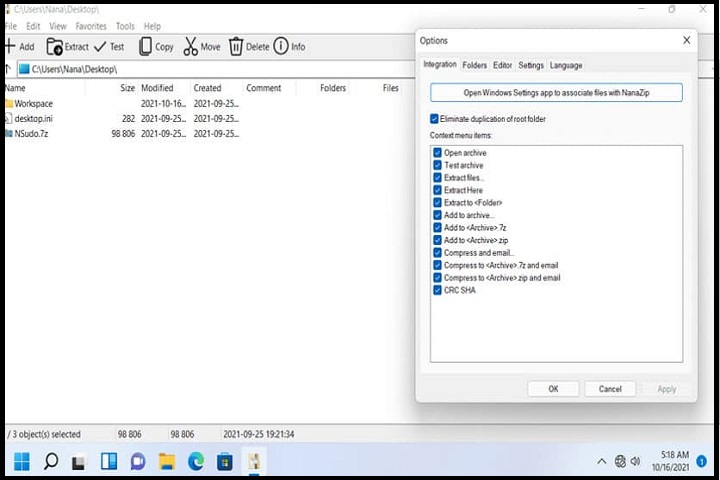
Description
NanaZip is more than just a basic archiver — it’s a comprehensive file compression solution designed for daily use. By supporting over 90 archive formats for extraction and many more for packing, NanaZip can be used as an all‑in‑one utility for handling compressed files of nearly any type.
Under the hood, NanaZip leverages powerful compression algorithms (including LZMA2) that provide excellent compression ratios and fast processing speeds. At the same time, its integration with Windows File Explorer allows users to compress or extract archives directly from the right‑click context menu, making it extremely convenient and efficient.
This version also addresses notable security concerns. Prior to version 6.0.1638.0, there were some vulnerabilities related to how certain archive formats were parsed, including potential information disclosure and crash‑inducing issues. These have since been resolved in this update, making the software safer for everyday use.
NanaZip’s design prioritizes ease of use without sacrificing advanced functionality. Beginners can quickly create and extract common archive types, while more experienced users can leverage advanced features like encryption, self‑extracting archives, and wide‑format compatibility.
Key Features
Here are the main features that make NanaZip v6.0.1638.0 a standout file archiving solution for Windows users:
1. Broad Format Support
NanaZip supports a vast range of formats for compression and extraction, including popular types like ZIP and 7z, as well as many other less common formats. This makes it a one‑stop tool for nearly any archive task.
2. High Compression Ratios
Using optimized compression algorithms derived from 7‑Zip, NanaZip achieves excellent compression performance. This results in smaller archive sizes and efficient storage management.
3. Seamless Windows Integration
NanaZip integrates directly into Windows File Explorer via the right‑click context menu, allowing compression and extraction without launching a separate application.
4. AES‑256 Encryption
The software supports strong AES‑256 encryption for creating secure, password‑protected archives — ideal for protecting sensitive data.
5. Modern, User‑Friendly Interface
Unlike older archivers, NanaZip features a clean, modern user interface that aligns with Windows 10 and Windows 11 design standards, making it intuitive and approachable.
6. Fast Performance
Multi‑threaded compression and extraction ensure that NanaZip performs tasks quickly, even with large files and folders.
7. Open‑Source and Free
NanaZip is free to use for personal and commercial purposes, and its open‑source nature allows community auditing, contributions, and transparency.
8. Portable and MSIX Packaging
The update includes downloadable MSIX packages for modern Windows deployment, as well as portable binaries for users who want a no‑install option.
9. UI and Localization Enhancements
Version 6.0.1638.0 includes bug fixes, improved layout behaviors, and updated translations — making the interface more stable and usable for international users.
How To Install
Follow these simple steps to install NanaZip on your Windows PC:
1. Download the Installer
Visit the official NanaZip website or the project’s GitHub release page, and download the MSIX installer for version v6.0.1638.0. Alternatively, a portable version may be available if you prefer not to install.
2. Launch the Installer
After downloading, double‑click the MSIX file. Windows may prompt you to confirm installation from an unverified publisher — click Install to proceed.
3. Allow Permissions
If Windows asks for permissions to integrate NanaZip into File Explorer, accept them to enable the context menu features.
4. Complete Installation
Once installation finishes, NanaZip will be available via the Start Menu. You can also access its features by right‑clicking any file or folder in File Explorer.
5. (Optional) Set Default Handlers
You may choose to set NanaZip as your default archive handler via Windows Settings or within NanaZip’s options — this will make it automatically open supported archive types.
System Requirements
Before installing NanaZip v6.0.1638.0, make sure your system meets the following requirements:
Operating System
• Windows 10, version 2004 (Build 19041) or later
• Windows 11 (recommended for full integration)
• Windows Server 2022 (Build 20348) or later
Processor
• 64‑bit processor (x86 or ARM) compatible with Windows 10/11
Memory (RAM)
• Minimum: 2 GB (4 GB or more recommended for large archives)
Storage
• At least 100 MB of free disk space for installation and temporary work files
Additional
• MSIX support in Windows for the installer package
• Administrator permissions may be required for installation