Introduction
Microsoft Desktops 2.01 PC Software Managing multiple tasks and applications simultaneously can become chaotic, especially on a single desktop. Microsoft Desktops 2.01 PC Software is a lightweight utility that empowers Windows users to create and manage multiple virtual desktops, improving organization, workflow, and productivity. Developed by Microsoft, this software allows users to divide their work environment across several desktops, keeping projects, applications, and tasks separate and easily accessible.
Designed for efficiency, Microsoft Desktops 2.01 is ideal for professionals, students, and casual users who frequently multitask. Its simple interface, low resource usage, and seamless Windows integration make it an essential tool for anyone looking to optimize their desktop workspace.
Overview
Microsoft Desktops 2.01 is a Windows-based application designed to manage multiple virtual desktops on a single PC. Instead of cluttering one screen with numerous open windows, users can organize their work across separate desktops. This makes switching between projects faster and reduces visual overload.
The software is highly compatible with older and modern Windows versions and is lightweight, meaning it does not slow down system performance. It is especially useful for programmers, designers, and office workers who need to keep multiple applications open simultaneously without losing focus.
Unlike other third-party virtual desktop applications, Microsoft Desktops 2.01 is free, reliable, and comes from a trusted developer. Its main focus is on simplicity and functionality rather than complex features, ensuring an intuitive experience for all users.
Description
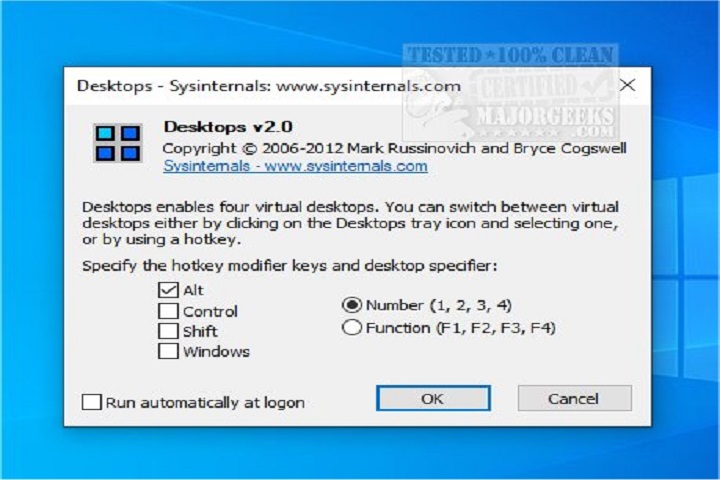
Microsoft Desktops 2.01 PC Software allows users to create up to four separate desktops on a single Windows PC. Each desktop functions independently, giving users the flexibility to dedicate a workspace to a particular project or task. Applications opened in one desktop remain isolated from the others, allowing for a cleaner, more organized workflow.
Switching between desktops is easy using customizable hotkeys or the system tray interface. The software runs quietly in the background, consuming minimal CPU and memory. This ensures smooth performance even on older or low-spec PCs.
Microsoft Desktops 2.01 is particularly useful for multitasking. For example, a user can dedicate one desktop to work-related applications, another to communication tools, a third for multimedia, and a fourth for personal browsing. This separation improves focus, reduces clutter, and increases productivity.
As a free Microsoft utility, it offers reliability and security, eliminating concerns about malware or bloatware that can come with some third-party virtual desktop tools.
Key Features
1. Multi-Desktop Support
Create up to four separate desktops for better task organization and multitasking.
2. Lightweight and Efficient
Optimized to run smoothly with minimal impact on system performance.
3. Easy Desktop Switching
Switch between desktops quickly using keyboard shortcuts or the system tray menu.
4. Independent Workspaces
Applications on one desktop remain isolated from other desktops.
5. Simple and Intuitive Interface
User-friendly design suitable for beginners and advanced users alike.
6. Seamless Windows Integration
Integrates directly with Windows systems without compatibility issues.
7. Free to Use
Official Microsoft utility available at no cost.
8. Reliable and Stable
No crashes, advertisements, or hidden software included.
9. Minimal System Requirements
Runs efficiently even on older Windows machines.
10. Productivity Enhancement
Helps users focus by reducing desktop clutter and improving workflow organization.
How To Install
Installing Microsoft Desktops 2.01 PC Software is quick and straightforward:
-
Run the Installer
Locate the downloaded file and double-click to begin the installation wizard. -
Accept License Agreement
Read the Microsoft Software License Terms and click Accept to proceed. -
Choose Installation Directory
Select the folder where the software should be installed, or keep the default path. -
Complete Installation
Click Install and wait for the process to finish. -
Launch Microsoft Desktops
Access the software from the Start Menu or system tray icon. -
Start Managing Desktops
Use the system tray interface or hotkeys to switch between desktops, create new desktops, and organize applications.
System Requirements
Microsoft Desktops 2.01 is a lightweight utility with minimal system requirements, making it compatible with most Windows PCs.
Minimum System Requirements
-
Operating System: Windows XP, Vista, 7, 8, 10
-
Processor: Intel or AMD processor (1 GHz or higher)
-
RAM: 256 MB
-
Storage: 20 MB free disk space
-
Display: Any standard monitor
-
Other Requirements: Keyboard and mouse