Introduction
LibrePCB 1.3.0 PC Software Printed Circuit Board (PCB) design is a critical step in electronics development, whether for hobby projects, academic research, or professional hardware production. Engineers and designers need reliable, accurate, and easy-to-use software to convert circuit ideas into manufacturable PCB layouts. LibrePCB 1.3.0 PC Software is a powerful open-source solution created to meet these needs without the cost or limitations of proprietary tools.
LibrePCB is designed with modern usability in mind, offering a clean interface, intelligent workflows, and strong library management. Version 1.3.0 brings further improvements in stability, performance, and design features, making it a strong choice for beginners and experienced PCB designers alike. This article provides a complete overview of LibrePCB 1.3.0, including its features, installation process, and system requirements.
Overview of LibrePCB 1.3.0 PC Software
LibrePCB is a free and open-source electronic design automation (EDA) software focused on schematic capture and PCB layout design. Unlike many traditional PCB tools, LibrePCB emphasizes clarity, consistency, and error prevention through its unique library and project structure.
The 1.3.0 release improves usability and adds enhancements to schematic editing, board layout tools, and project management. LibrePCB supports modern design practices and is actively developed by a growing community of engineers and contributors.
LibrePCB runs on Windows, Linux, and macOS, making it a cross-platform solution suitable for individuals, startups, educational institutions, and open-source hardware projects.
Description of LibrePCB 1.3.0 PC Software
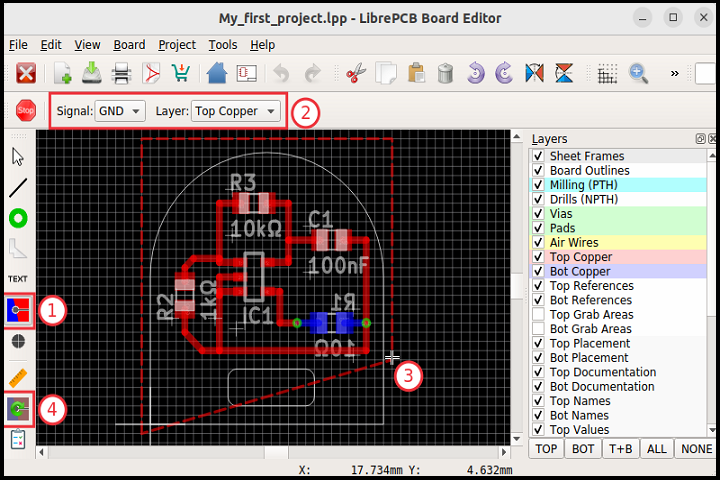
LibrePCB 1.3.0 provides a complete workflow for designing electronic circuits and PCBs. The software separates schematic symbols, footprints, and device definitions, reducing errors and improving reusability across projects. This structured approach ensures that connections between schematics and PCB layouts remain consistent.
The schematic editor allows users to create clean and readable circuit diagrams using intuitive tools and snap-to-grid alignment. Real-time error checking helps identify missing connections or incorrect configurations early in the design process.
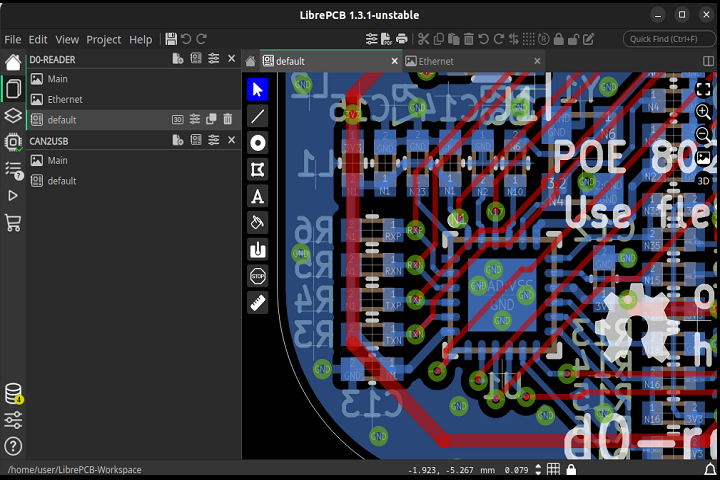
The PCB layout editor supports multi-layer boards, precise routing tools, and customizable design rules. Users can manually route traces or use assisted routing features to speed up the layout process. LibrePCB also supports industry-standard manufacturing outputs such as Gerber files and pick-and-place data.
With LibrePCB 1.3.0, designers gain a stable, transparent, and community-driven platform that prioritizes correctness, clarity, and long-term project maintainability.
Key Features of LibrePCB 1.3.0 PC Software
1. Open-Source and Free
LibrePCB is completely free to use, with no licensing fees or feature restrictions. Its open-source nature ensures transparency and continuous improvement.
2. Schematic Capture Tool
Create professional-grade circuit schematics using a clean and modern editor with grid alignment and real-time validation.
3. Advanced PCB Layout Editor
Design single-layer, double-layer, or multi-layer PCBs with precise routing tools, layer management, and board shape editing.
4. Intelligent Library Management
LibrePCB separates symbols, footprints, and devices, minimizing design errors and improving reuse across projects.
5. Design Rule Checking (DRC)
Built-in checks help identify spacing violations, unconnected nets, and other design issues before manufacturing.
6. Multi-Platform Support
LibrePCB works on Windows, Linux, and macOS, allowing designers to work across different systems.
7. Manufacturing File Export
Export Gerber files, drill files, BOMs, and pick-and-place data compatible with professional PCB manufacturers.
8. User-Friendly Interface
The modern and uncluttered interface makes LibrePCB suitable for beginners while still powerful enough for advanced users.
9. Active Community Support
LibrePCB benefits from active development, community forums, and documentation that help users learn and troubleshoot.
How To Install LibrePCB 1.3.0 PC Software
Installing LibrePCB 1.3.0 on a Windows PC is simple and straightforward. Follow these steps:
-
Download the LibrePCB 1.3.0 Windows installer.
-
Locate the downloaded setup file and double-click it to start the installation.
-
Follow the on-screen instructions and accept the license terms.
-
Choose the installation directory (default location is recommended).
-
Click Install and wait for the installation process to complete.
-
Once finished, launch LibrePCB from the Start Menu or desktop shortcut.
After installation, you can create a new project or open sample projects to explore LibrePCB’s features.
System Requirements for LibrePCB 1.3.0 PC Software
Before installing LibrePCB 1.3.0, ensure your system meets the following requirements:
Minimum Requirements
-
Operating System: Windows 10 or Windows 11 (64-bit)
-
Processor: Intel or AMD processor, 1.5 GHz or faster
-
RAM: 4 GB
-
Storage: 500 MB of free disk space
-
Display: 1280×800 resolution or higher