Introduction
Distill Web Monitor PC Software, In a digital era where information changes rapidly, keeping track of website updates, pricing changes, or content modifications can be a challenge.is a powerful PC software designed to automate this process, allowing users to monitor web pages for changes and receive real-time alerts. Whether you are a business professional, a researcher, an e-commerce manager, or simply someone who wants to track website content, Distill Web Monitor makes this task efficient and effortless.
Unlike traditional manual monitoring, which requires constant checking of websites, Distill Web Monitor automates the workflow. It helps users save time, ensures accuracy, and guarantees that no important update goes unnoticed. Its intuitive interface and advanced customization features make it one of the most popular web monitoring tools available today.

Overview
Distill Web Monitor is a Windows-compatible software that enables users to track web pages for any changes. Users can monitor entire web pages or specific elements, such as prices, headlines, text blocks, or product availability. When a change occurs, the software sends instant notifications through various channels, including email, desktop alerts, or SMS.
The software is ideal for a wide range of use cases, including:
-
E-commerce monitoring: Track competitor pricing or product availability.
-
News and research: Stay updated with the latest articles, announcements, or academic content.
-
Business intelligence: Monitor company websites, stock updates, or regulatory changes.
-
Personal tracking: Follow updates on blogs, forums, or online communities.
Distill Web Monitor is available for PC and integrates seamlessly with browsers, allowing users to select and monitor specific web page elements accurately. It supports both simple and complex monitoring tasks, catering to beginners and advanced users alike.
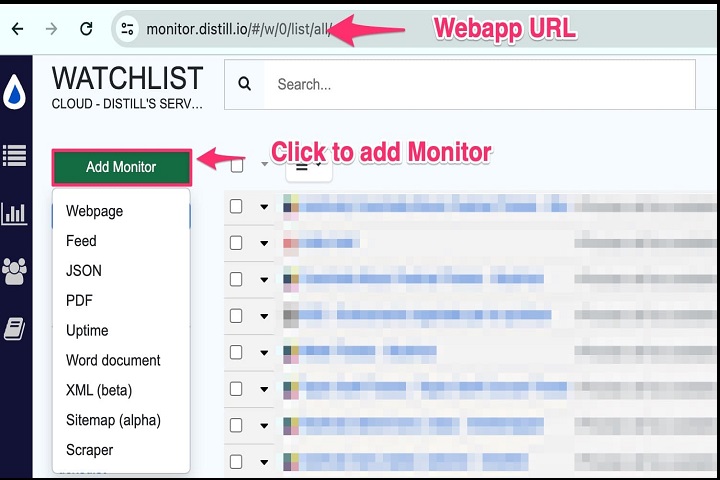
Description
Distill Web Monitor is more than just a simple change detection tool; it is a comprehensive web monitoring solution. It works by capturing snapshots of web pages at regular intervals and comparing them to previous versions. Users can define monitoring intervals, frequency, and thresholds for detecting changes.
The software allows users to monitor:
-
Full web pages: Detect any changes across the entire page.
-
Specific elements: Track text, images, tables, or other elements using element selectors.
-
Forms and dynamic content: Monitor interactive sections of websites.
One of the software’s key strengths is its real-time alert system. Whenever a monitored page changes, users receive immediate notifications via email, desktop pop-ups, or even SMS if configured. This ensures that users can respond promptly to important updates.
For professionals, Distill Web Monitor offers automation features such as exporting collected data, generating reports, and integrating with workflow tools. It can monitor multiple pages simultaneously, making it suitable for businesses and large-scale monitoring tasks.
Security is a focus for Distill Web Monitor as well. All data is transmitted securely, and users have control over sensitive credentials if monitoring requires login-protected pages.
Key Features
Distill Web Monitor comes with a variety of features designed to make web monitoring simple and efficient:
-
Element-Level Monitoring – Track specific sections of a web page instead of the entire page.
-
Automatic Change Detection – Detect content changes automatically at customizable intervals.
-
Real-Time Alerts – Receive notifications via email, desktop, or SMS when changes occur.
-
Multi-Page Monitoring – Monitor multiple pages at once for efficiency.
-
Export and Reporting – Save monitored data in CSV or other formats for analysis.
-
Custom Monitoring Frequency – Set intervals ranging from minutes to hours depending on needs.
-
Browser Integration – Use the browser extension to select elements precisely.
-
Dynamic Content Monitoring – Track updates in forms, tables, or interactive content.
-
Secure Data Handling – Manage login-protected pages safely with encrypted credentials.
-
User-Friendly Interface – Intuitive design for beginners and advanced monitoring.
How to Install Distill Web Monitor
Installing Distill Web Monitor on a Windows PC is straightforward:
-
Run the Installer – Locate the downloaded setup file and double-click to start the installation. Administrative privileges may be required.
-
Follow the Setup Wizard – Accept the license agreement, choose the installation folder, and proceed with optional components if available.
-
Complete Installation – Click “Install” to finalize the setup. After installation, launch the software from the Start Menu or desktop shortcut.
-
Initial Setup – Configure monitoring preferences such as alert type, interval, and page selection.
-
Start Monitoring – Add web pages to your dashboard, select elements to monitor, and let Distill Web Monitor track changes automatically.
System Requirements
To run Distill Web Monitor efficiently on a PC, ensure your system meets the following requirements:
Minimum Requirements:
-
Operating System: Windows 7, 8, 10, or 11
-
Processor: Intel or AMD 1 GHz or higher
-
RAM: 2 GB
-
Storage: 100 MB free disk space
-
Internet Connection: Required for real-time monitoring and alerts