Introduction
CPU-Z 2.18 PC Software, In the modern computing environment, understanding the technical specifications of your PC is essential for optimizing performance, troubleshooting hardware issues, and upgrading components. CPU-Z 2.18 is a comprehensive system information utility for Windows PCs that provides detailed insights into your computer’s hardware.
From identifying processor specifications to monitoring memory performance, CPU-Z has long been a trusted tool for both casual users and IT professionals. Version 2.18 introduces enhanced hardware detection, better compatibility with modern CPUs, and updated reporting features, making it one of the most reliable utilities for analyzing system components.
Whether you are a gamer, hardware enthusiast, system builder, or IT technician, CPU-Z 2.18 helps you gather accurate information about your CPU, motherboard, RAM, and other critical components.

Overview
CPU-Z 2.18 is a Windows-based diagnostic and monitoring tool designed to provide real-time information about the internal components of a PC. Unlike generic system properties windows, CPU-Z gives detailed, precise, and comprehensive hardware information, including clock speeds, voltages, cache sizes, and RAM timings.
The software is lightweight, fast, and does not require installation unless you prefer the setup version. It is compatible with a wide range of processors, motherboards, and memory types, making it suitable for both modern and older PCs. CPU-Z also provides a portable version for technicians who need to test multiple machines without installation.
With its intuitive interface and advanced reporting features, CPU-Z 2.18 allows users to monitor system performance, verify hardware specifications, and even detect hardware issues that may affect overall PC stability.
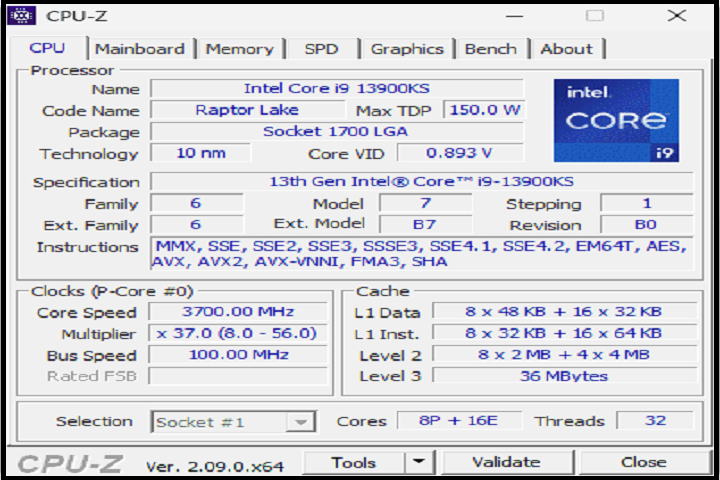
Description
CPU-Z 2.18 is more than just a system information tool; it is a hardware monitoring and verification utility. The software is capable of reading the CPU name, core stepping, clock speeds, and core voltage, offering detailed insights into processor performance.
It also displays detailed motherboard information, including manufacturer, chipset, BIOS version, and socket type. For memory enthusiasts, CPU-Z provides real-time RAM data, including memory type, size, timings, and frequency. This is particularly useful when overclocking or verifying memory configurations.
In addition to CPUs and RAM, CPU-Z 2.18 reports on graphics card specifications, system buses, and other hardware components. Users can generate detailed reports and save them in text or HTML formats for documentation or technical support purposes.
CPU-Z is widely used for performance benchmarking, troubleshooting hardware issues, verifying component authenticity, and ensuring that the installed hardware matches the intended configuration. Its precision and ease of use have made it a staple tool for system builders, overclockers, and IT technicians worldwide.
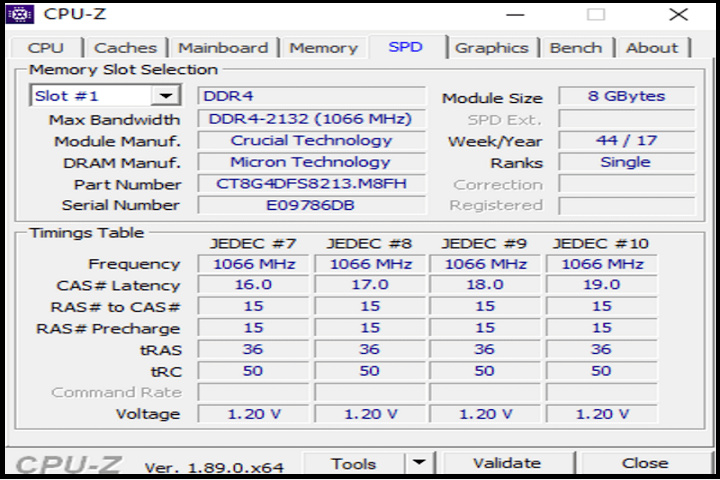
Key Features
CPU-Z 2.18 comes packed with features designed for detailed hardware monitoring and reporting:
-
CPU Detection – Provides detailed information about processor name, architecture, cores, threads, clock speeds, cache sizes, and voltage.
-
Motherboard Information – Displays manufacturer, model, chipset, BIOS version, and socket type.
-
Memory Monitoring – Shows RAM type, size, frequency, and timing for accurate performance analysis.
-
Graphics Card Details – Detects GPU type, memory size, and graphics interface.
-
System Bus Information – Monitors front-side bus, PCIe lanes, and other key system buses.
-
Real-Time Monitoring – Tracks clock speeds, voltages, and temperatures in real-time.
-
Benchmarking and Validation – Allows performance comparisons and verifies component specifications.
-
Portable Version Available – Run CPU-Z without installation for on-the-go diagnostics.
-
Report Generation – Export hardware information in text or HTML formats.
-
Compatibility with Modern Hardware – Supports Intel, AMD, and ARM processors, as well as the latest motherboards and memory modules.
These features make CPU-Z 2.18 essential for anyone looking to analyze, monitor, and optimize PC hardware.
How To Install CPU-Z 2.18
Installing CPU-Z 2.18 on a Windows PC is straightforward and can be done in a few steps:
-
Double-click the downloaded
.exefile to launch the installer. -
Accept the license agreement and select the installation directory.
-
Click Install and wait for the process to complete.
-
Launch CPU-Z from the desktop shortcut or Start Menu.
-
Optionally, download the portable ZIP version if installation is not desired.
-
Explore tabs for CPU, Cache, Mainboard, Memory, SPD, Graphics, and About sections to view detailed hardware specifications.
Once installed or run as a portable app, CPU-Z provides instant access to comprehensive system information for diagnostics, upgrades, or performance monitoring.
System Requirements
CPU-Z 2.18 is lightweight and designed to work on most Windows PCs:
Minimum System Requirements
-
Operating System: Windows 7, 8, 10, or 11
-
Processor: Intel or AMD processor (any generation)
-
RAM: 512 MB
-
Storage: 50 MB free disk space
-
Graphics: DirectX-compatible display adapter