Introduction
BirdFont 6.15.5 PC Software is a versatile and intuitive tool designed for creating vector graphics and designing custom fonts. Developed by BirdFont Project, this software caters to both professional designers and hobbyists who want to create scalable typefaces for personal, commercial, or web use.
In the world of digital design, custom fonts are critical for branding, graphic design, UI/UX projects, and creative expression. BirdFont 6.15.5 provides an accessible platform that allows users to create, edit, and export fonts in popular formats like TTF, OTF, and SVG, making it a preferred choice for designers looking for precision and flexibility.

Overview
BirdFont 6.15.5 is a professional font creation and vector graphics tool that offers a user-friendly interface with powerful design features. It is suitable for designing fonts from scratch, modifying existing typefaces, or converting vector graphics into fonts.
Key highlights of version 6.15.5 include:
-
Support for TTF, OTF, and SVG font formats
-
Vector-based drawing tools for scalable font creation
-
Advanced kerning and spacing controls
-
OpenType feature support for professional typography
-
Export options compatible with desktop and web use
This software is ideal for graphic designers, typographers, UI/UX designers, and branding specialists who need full control over the font creation process.
Description
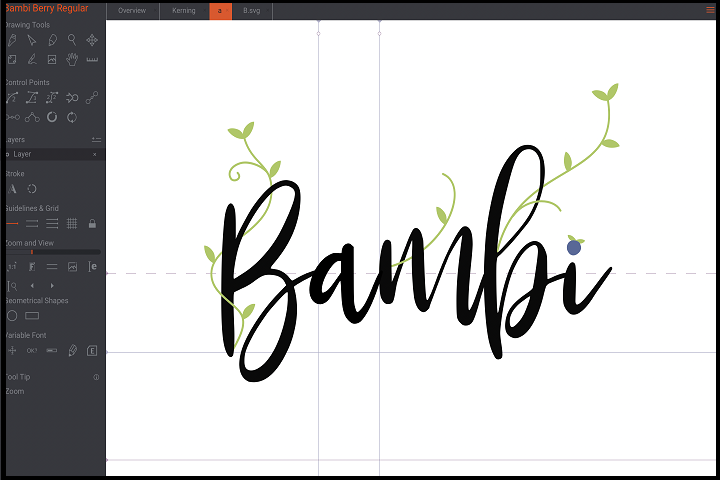
BirdFont 6.15.5 is a comprehensive font design software that combines vector drawing, typeface management, and export features into a single platform. It allows designers to craft fonts that are fully scalable, professional, and compatible across multiple devices and platforms.
Vector-Based Font Creation
BirdFont is built around vector graphics, which ensures that all fonts created are scalable without loss of quality. Designers can create glyphs using Bézier curves, shapes, and vector tools to ensure precision and accuracy.
Custom Glyph Design
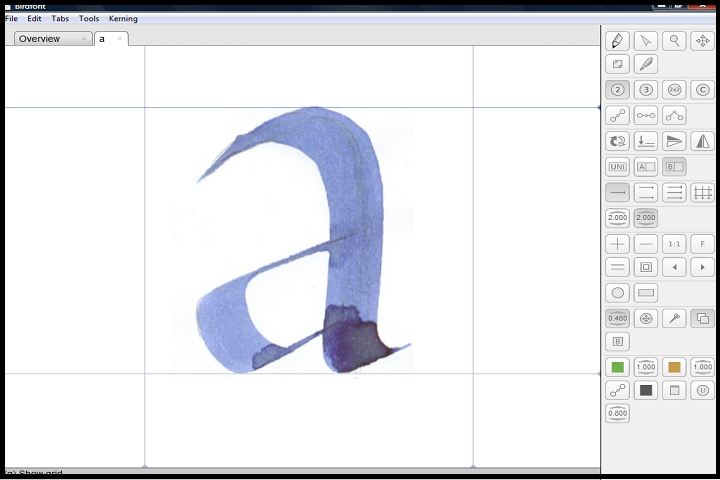
Users can create custom glyphs for letters, numbers, symbols, or icons. The software allows manual editing of paths, curves, and points, enabling full control over the appearance of each character.
Kerning and Spacing
BirdFont 6.15.5 offers advanced kerning and spacing options, allowing designers to adjust the distance between characters and words for better readability and aesthetics. Proper kerning ensures professional-looking typefaces suitable for print and digital media.
OpenType Features
This version supports OpenType features, including ligatures, stylistic sets, and alternative characters. Designers can add advanced typographic options to their fonts, enhancing their versatility and usability.
Import and Export
BirdFont allows users to import vector graphics from SVG files or other vector software to convert them into glyphs. It supports exporting fonts as:
-
TrueType Fonts (TTF) for desktop applications
-
OpenType Fonts (OTF) for professional design software
-
SVG Fonts for web use and scalable vector applications
Font Preview and Testing
The software provides a live preview mode to test fonts as they are being designed. Designers can type sample text, adjust sizes, and see how characters interact in real-time.
Open Source and Community Support
BirdFont is an open-source project, encouraging contributions from the design community. Users benefit from regular updates, community plugins, and tutorials, making it accessible to beginners and experts alike.
Key Features
Vector Drawing Tools
Create precise glyphs with Bézier curves, shapes, and vector editing capabilities.
Support for Multiple Font Formats
Export designs as TTF, OTF, or SVG, compatible with desktop and web applications.
Advanced Kerning and Spacing
Adjust character spacing and word spacing for professional typography.
OpenType Feature Support
Include ligatures, alternate characters, and stylistic sets for advanced fonts.
Import SVG Graphics
Convert existing vector graphics into fonts for unique glyph design.
Live Font Preview
View and test your font in real-time before exporting.
Custom Glyph Management
Organize and edit individual glyphs for full control over font design.
User-Friendly Interface
Intuitive interface suitable for both beginners and professional typographers.
Open Source and Community-Driven
Access community tutorials, updates, and shared resources for learning and support.
Cross-Platform Compatibility
Works on Windows, macOS, and Linux, providing flexibility across systems.
How to Install
Installing BirdFont 6.15.5 is simple and straightforward:
-
Check System Requirements
Ensure your PC meets the minimum hardware and software specifications. -
Run the Installer
Double-click the downloaded file and run it with administrator privileges. -
Select Installation Directory
Choose the folder where BirdFont will be installed. -
Complete Installation
Follow the on-screen instructions to finalize the installation. -
Launch BirdFont
Open the software to begin creating or editing fonts. -
Optional Plugins
Install community plugins or additional templates to enhance functionality.
System Requirements
Minimum System Requirements
-
Operating System: Windows 7 / 8 / 10 / 11
-
Processor: Intel or AMD 1 GHz or higher
-
RAM: 2 GB minimum
-
Storage: 200 MB free disk space
-
Display: 1024×768 resolution
-
Other: Graphics card supporting OpenGL 2.0 or higher