Introduction
Formware 3D Slicer 1.3.0.8 PC Software is a professional-grade slicing application developed by Formware, designed specifically for resin-based 3D printing technologies such as SLA, DLP, and MSLA. The software converts 3D models into precise layer-by-layer instructions that resin 3D printers use to produce highly detailed and accurate prints.
As resin 3D printing continues to grow in popularity for industries like dental, jewelry, engineering, and prototyping, the need for a powerful and reliable slicer becomes critical. Formware 3D Slicer stands out due to its advanced control options, robust support generation, and compatibility with a wide range of printers. Version 1.3.0.8 further refines stability, usability, and slicing accuracy, making it a strong choice for professionals and advanced hobbyists alike.

Overview
Formware 3D Slicer is purpose-built for users who require precision, customization, and reliability in resin 3D printing workflows. Unlike entry-level slicers, it offers deep access to slicing parameters, enabling users to fine-tune exposure times, lift speeds, support structures, and layer settings for optimal print quality.
The software supports a broad ecosystem of resin printers and file formats, making it flexible for both commercial and personal use. With version 1.3.0.8, Formware improves slicing speed, enhances printer profile handling, and introduces refinements to the user interface that streamline the overall workflow on Windows-based PCs.
Whether used for producing dental models, miniatures, engineering parts, or artistic designs, Formware 3D Slicer provides consistent and predictable results across different resin materials and printer configurations.
Description
Formware 3D Slicer operates as a bridge between 3D modeling software and resin 3D printers. Users import 3D models—commonly in STL, OBJ, or 3MF formats—into the slicer, configure printing parameters, and generate printer-ready files that define each layer’s exposure and movement.
User Interface
The interface is clean and functional, designed to give users both visual and numerical control. Models can be rotated, scaled, hollowed, and analyzed directly within the workspace. Real-time previews allow users to inspect each sliced layer before printing, reducing the risk of print failures.
Slicing Engine
At the core of Formware 3D Slicer is a high-precision slicing engine optimized for resin printing. It calculates layer exposures with high accuracy, ensuring dimensional consistency and excellent surface finish. The engine is designed to handle complex geometries and high-polygon models without sacrificing performance.
Support Generation
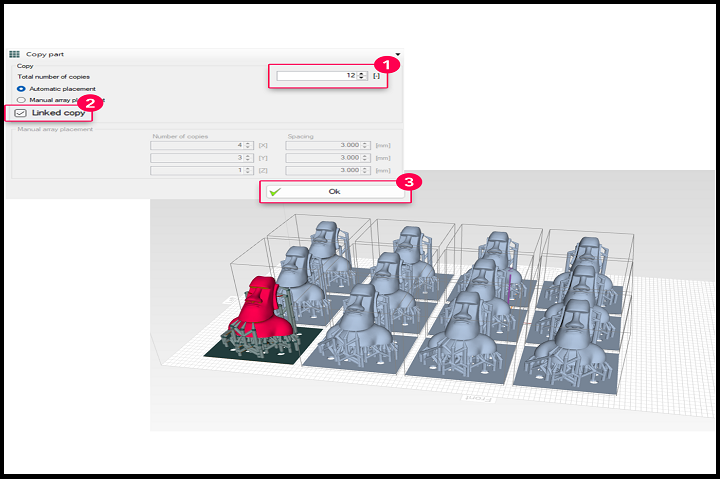
Support structures are essential for resin printing, and Formware excels in this area. It offers both automatic and manual support generation tools, allowing users to customize support density, contact points, and thickness for different parts of the model.
Printer Profiles
The software includes customizable printer profiles that store machine-specific parameters such as resolution, build volume, and exposure settings. This makes it easy to switch between multiple printers or resin types while maintaining consistent output quality.
Key Features
Advanced Support Generation
Formware provides precise control over support placement, shape, and strength. Users can manually add or edit supports to ensure delicate features are properly reinforced while minimizing post-processing effort.
High-Precision Resin Slicing
The slicer is optimized for SLA, DLP, and MSLA printers, delivering accurate layer calculations that result in smooth surfaces and sharp details.
Extensive Printer Compatibility
Formware supports a wide range of third-party resin printers, making it a versatile solution for mixed hardware environments.
Model Repair and Optimization
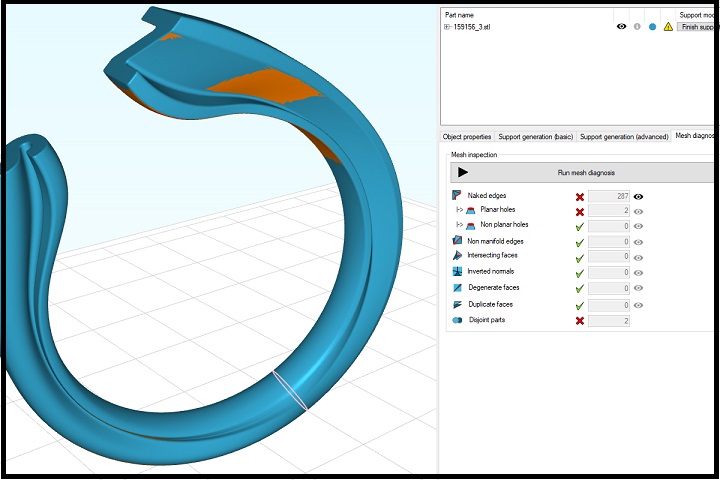
Built-in tools help detect and fix common model issues such as non-manifold edges and holes, improving print success rates.
Custom Exposure & Motion Settings
Users can fine-tune exposure times, lift distances, peel speeds, and delay settings for different resins and layer heights.
Layer Preview & Simulation
A detailed layer-by-layer preview allows users to inspect slices before exporting, helping identify errors early in the process.
Professional Workflow Control
Formware is designed for users who want full control rather than simplified presets, making it ideal for production environments and advanced users.
How to Install
Installing Formware 3D Slicer on a Windows PC is simple and straightforward:
-
Check System Requirements
Ensure your PC meets the minimum or recommended system requirements before proceeding. -
Run the Setup File
Double-click the installer and run it with administrator privileges. -
Follow Installation Prompts
Accept the license agreement and choose the installation directory. -
Complete Installation
Finish the setup process and allow the installer to create desktop or Start Menu shortcuts. -
Launch the Software
Open Formware 3D Slicer and configure your printer profiles before starting your first project.
System Requirements
Minimum System Requirements
-
Operating System: Windows 10 or Windows 11 (64-bit)
-
Processor: Intel Core i3 or equivalent
-
RAM: 4 GB minimum
-
Storage: 500 MB free disk space
-
Graphics: Integrated or dedicated GPU with OpenGL support